What Are Terminal-Native Web Agents? Microsoft Webwright and the End of Click-by-Click Computer Use (2026)

TL;DR
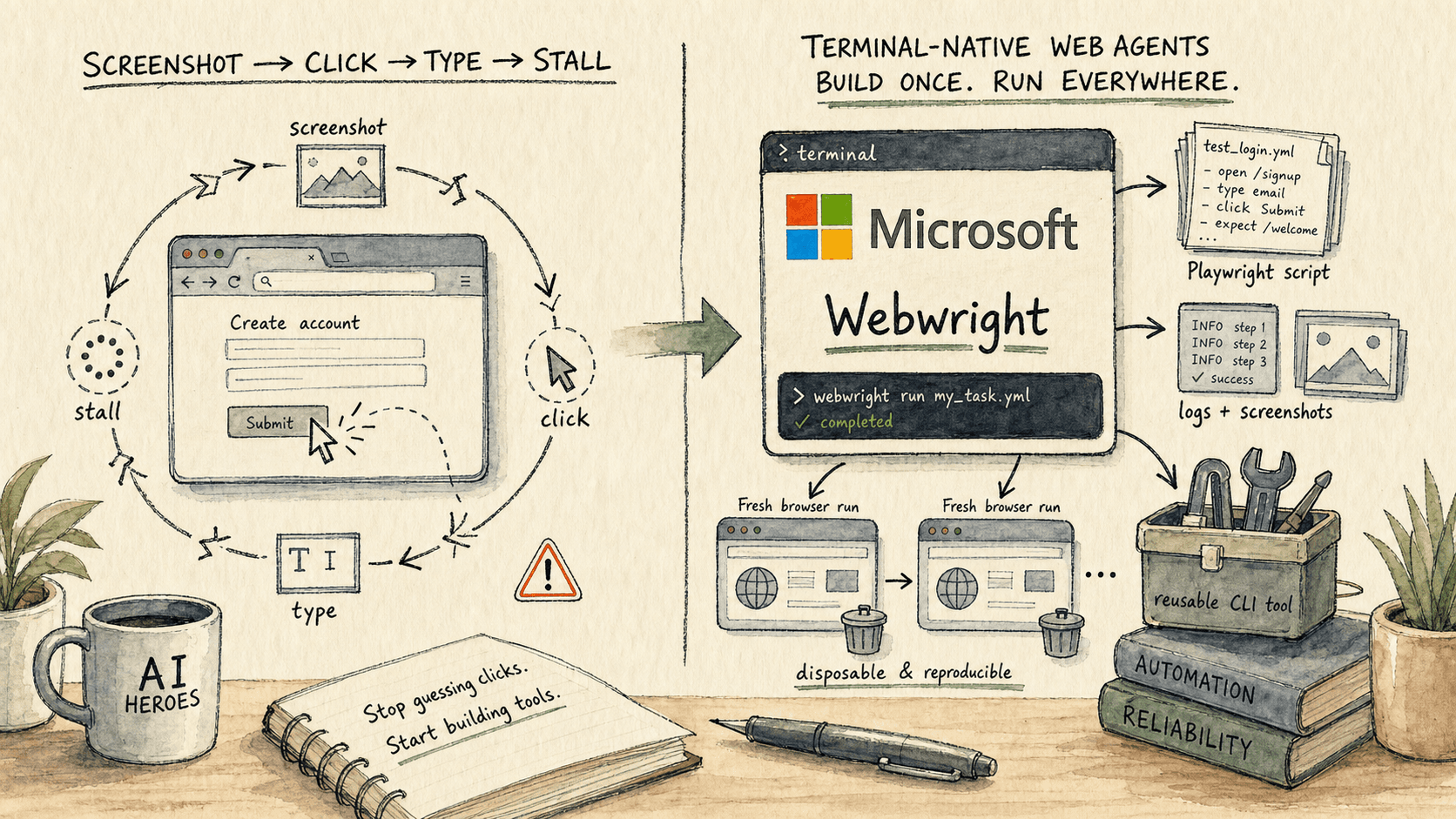
- A terminal-native web agent is an AI agent that treats the terminal and workspace as the durable state, while browser sessions become disposable test environments. Microsoft Research's Webwright is the clearest current example: the agent writes Playwright-backed Python, runs it, debugs the failures, saves logs and screenshots, then leaves behind a reusable program.
- The important shift is not Microsoft beating other browser agents on a benchmark. The important shift is the action space: long web workflows stop being hundreds of fresh click guesses and become code, waits, selectors, loops, retries, screenshots, and a final rerun that can be inspected.
- The winning production pattern is hybrid. Use click/type/screenshot computer use for novel interfaces and one-off recovery, but convert repeatable browser work into validated scripts or cached actions as quickly as possible.
Last updated: 27 May 2026
Most web agents still work like a nervous intern with a mouse. They look at the screen, guess the next click, type a little, wait for the page to move, then guess again. That can feel magical on a five-step demo. It feels very different when the task is a 40-step form, a moving job board, a travel search, an internal admin portal, or a website that quietly changes one button label after lunch.
Microsoft Research's Webwright matters because it reframes the browser as an environment to program, not a surface to poke. The browser still appears. Screenshots still matter. Low-level actions still matter. But the persistent artifact is not the browser session. It is the workspace: Python files, Playwright scripts, logs, screenshots, final-run folders, and eventually a reusable command-line tool.
That is the category shift worth naming: terminal-native web agents.
What is a terminal-native web agent?
A terminal-native web agent is an AI agent that uses a terminal, local files, and code execution as its main workspace, while launching browser sessions only when it needs to inspect, test, or run a web workflow.
In the old computer-use loop, state lives mainly in the browser. The model sees the current screen, emits a click or type action, waits for the harness to execute it, sees a new screenshot, and repeats. In a terminal-native loop, state lives in the project folder. The agent can write an exploratory script, run it, inspect the traceback, capture a screenshot, edit the script, rerun from a clean browser, and keep every artifact for later review.
Microsoft's Webwright project page says this plainly: Webwright gives the model a terminal, a local workspace, and the freedom to write code that launches, inspects, and discards browser sessions. The output is not just the completed web task; it is a reusable program.
That definition matters because it separates two things people often collapse into one phrase: computer use and browser automation.
| Pattern | Durable state | Main action space | Best fit | Failure mode |
|---|---|---|---|---|
| Screenshot computer use | Current browser or desktop screen | Click, type, scroll, drag, wait | Novel interfaces, desktop apps, one-off tasks, fallback recovery | Error accumulation across long chains of actions |
| Terminal-native web agent | Local workspace: code, logs, screenshots, outputs | Playwright/Python scripts, shell commands, fresh browser runs | Repeatable web workflows, form flows, extraction, booking/search tasks, admin routines | Script maintenance when sites change |
| Developer-written automation | Repo codebase and tests | Playwright/Selenium/Puppeteer written by humans | Stable known workflows with engineering ownership | High upfront effort and maintenance burden |
The terminal-native pattern does not make visual computer use obsolete. It makes the browser stop being the only memory.
Why do click-by-click web agents break on long tasks?
Click-by-click agents break on long tasks because every step is a fresh prediction made against a changing interface, and one small error can poison the rest of the browser state.
OpenAI's computer-use documentation describes the standard loop clearly: the model looks at a screenshot, returns actions such as clicks, typing, or scrolling, the harness executes them, then sends back a new screenshot so the model can decide what to do next. Anthropic's computer-use tool exposes the same broad capability class: screenshot capture, mouse control, keyboard input, and desktop automation.
That is powerful. It is also fragile on long web jobs. A web page can lazy-load a form field. A cookie banner can cover a button. A date picker can animate. A submit button can be disabled until validation completes. A login state can expire. A modal can steal focus. A coordinate that was right a second ago can become wrong after a re-render.
The result is a compounding-error problem. The agent is not just making one hard decision. It is making a long sequence of small decisions where each one changes the state the next decision sees.
Playwright exists because reliable browser automation usually needs more structure than "click here." Its official docs describe actionability checks before actions: a locator click waits for the element to resolve, be visible, stable, able to receive events, and enabled. That is the kind of machinery a terminal-native agent can use when it writes code instead of emitting raw mouse moves.
How does Microsoft Webwright work?
Webwright works by giving the model a deliberately small terminal harness: the model emits shell commands, writes Playwright-backed Python scripts, runs them, observes logs/screenshots/errors, and keeps refining until it has a final script that can be rerun.
Microsoft describes the Webwright harness as three modules: a Runner, a Model Endpoint, and a terminal Environment. There is no orchestration tower, graph engine, or multi-agent hierarchy. The model receives the task and workspace context, emits a thinking block plus a shell command, the environment executes it, and observations flow back into the next step.
The important design decision is what counts as progress. In Webwright, progress is not "the browser is currently on the right page." Progress is "the workspace now contains a better script, clearer logs, useful screenshots, and a repeatable final run." The browser can be launched, inspected, killed, and relaunched. The code survives.
Webwright also adds two guardrails that matter for open-ended terminal agents:
| Webwright guardrail | Why it matters |
|---|---|
| Final fresh rerun | The agent has to run the final script in a fresh folder, not merely claim the current browser happened to finish. |
| Logs and screenshots | A failed run leaves evidence a human or another agent can inspect. |
| Self-reflection gate | The agent must judge whether critical points passed before done is accepted. |
| Context compaction | Long coding trajectories are summarized periodically while concrete artifacts remain in files. |
That is why the project feels less like a browser agent demo and more like a software-engineering loop applied to the web.
What did Microsoft report on Webwright's benchmarks?
Microsoft reported that Webwright with GPT-5.4 reached 86.7% on Online-Mind2Web and 60.1% on Odysseys, two benchmarks designed around live or long-horizon web tasks.
Online-Mind2Web is the more important number for a broad audience. The underlying paper, An Illusion of Progress? Assessing the Current State of Web Agents, introduced Online-Mind2Web as 300 realistic tasks across 136 websites, with an automatic LLM-as-judge evaluation method that the authors report reaches around 85% agreement with human judgement. Microsoft says GPT-5.4 with Webwright reached 86.7% on the full benchmark; Claude Opus 4.7 reached 84.7%, while Claude was stronger on the hard split at a 100-step budget.
Odysseys is the long-horizon signal. Microsoft describes it as 200 realistic browsing tasks with instructions averaging 272.3 words. The Webwright post reports 60.1% with GPT-5.4, compared with 33.5% for a base GPT-5.4 screenshot-and-coordinate approach and 44.5% for the previous state of the art on the leaderboard at the time.
| Benchmark | What it tests | Microsoft-reported Webwright result | Why it matters |
|---|---|---|---|
| Online-Mind2Web | 300 live web tasks across 136 sites | 86.7% with GPT-5.4; 84.7% with Claude Opus 4.7 | Broad real-site coverage, not a toy static page set |
| Odysseys | 200 long-horizon browsing tasks | 60.1% with GPT-5.4 | Long instructions, multi-step planning, cross-page work |
| Cost analysis | Average benchmark run cost under April 2026 prices | $2.37/task for GPT-5.4 vs. $6.09/task for Claude Opus 4.7 | Shows the reusable-script route can make the expensive thinking happen once |
Read these numbers with the right caveat: they are Microsoft-reported benchmark results for a new research system, not proof that every production Webwright-style workflow will survive every website. The stronger takeaway is directional. The same underlying model does better when it writes and debugs code than when it is forced to predict a long chain of coordinates.
Is Webwright better than computer use?
Webwright is better than click-by-click computer use for repeatable, structured web workflows; screenshot computer use remains better as a universal fallback for novel, visual, or non-browser interfaces.
This is the nuance most hot takes will miss. Low-level computer use is general. It can operate a weird desktop app, an internal portal, a browser tab, a file picker, or an interface with no clean DOM. Code-as-action is narrower, but more durable when it fits. If the task can be expressed as selectors, waits, loops, extraction rules, and validated reruns, code usually wins.
The clean production design is not either/or. It is escalation:
- Use visual computer use to inspect or recover when the environment is unknown.
- Convert stable repeated steps into Playwright or cached browser actions.
- Save logs and screenshots so failures are diagnosable.
- Validate scripts before reuse.
- Retire or repair scripts when the website changes.
That last point is the tradeoff. Webwright does not abolish maintenance. It moves maintenance from "babysit the agent every time" to "repair the reusable artifact when evidence shows it broke." That is still work, but it is the kind of work software teams know how to do.
How does Webwright compare with Stagehand and Browser Use?
Webwright, Stagehand, and Browser Use are converging on the same broad lesson: production browser agents need a path from AI-driven exploration to repeatable automation.
Stagehand, from Browserbase, explicitly positions itself as a bridge between natural language and code. Its README says to use AI when navigating unfamiliar pages and code when you know exactly what you want to do. It also emphasizes cached repeatable actions and self-healing. Browser Use sits closer to the agentic browser side: an open-source AI browser agent plus hosted cloud infrastructure for scalable, stealth-enabled automation, with demos for job applications, grocery shopping, and personal-assistant tasks.
Webwright's distinctive move is that the agent itself writes the reusable program as the task artifact. It is less about giving a developer a nicer browser-automation library, and more about turning a frontier coding model into the automation developer.
| System | Primary idea | Where it fits |
|---|---|---|
| Microsoft Webwright | Terminal-native agent writes Playwright scripts and leaves reusable programs | Research/agent architecture for repeatable web tasks |
| Stagehand | Mix natural language and code; cache repeatable browser actions | Production developer workflow where humans choose code vs AI |
| Browser Use | AI browser agent with open-source and cloud execution surfaces | General-purpose agentic browsing and hosted automation |
| OpenAI / Anthropic computer use | Model controls UI through screenshots, mouse, and keyboard actions | Universal UI operation, especially when code access is unavailable |
The direction is clear: the industry is moving away from pure perception-and-click loops for everything. The agents that matter will learn when to look, when to click, when to script, and when to reuse.
What should teams build with terminal-native web agents first?
Teams should start with boring, repeatable, browser-bound workflows where failures are costly but easy to verify: data collection, form preparation, report generation, portal checks, quote comparison, booking/search workflows, and internal admin routines.
Do not start with the riskiest task just because the demo is more exciting. Job applications, procurement portals, travel booking, social posting, and customer-account changes can all have consequences. The safer first projects are workflows where the agent can prepare the output, save evidence, and ask for human approval before anything external happens.
A good first Webwright-style workflow has five properties:
| Property | What it looks like |
|---|---|
| Repeated often | The task happens weekly or daily, not once a quarter. |
| Browser-bound | The workflow lives in portals, sites, or SaaS screens with limited APIs. |
| Verifiable | A human can inspect a report, screenshot, or final form before submission. |
| Parameterized | Dates, locations, companies, products, or accounts change between runs. |
| Repairable | If the site changes, logs and screenshots make the failure obvious. |
That is why the "agent applies to 15 jobs" anecdote is useful but not the whole article. The broader business opportunity is any long web workflow that currently requires a person to babysit a browser because there is no clean API.
What are the risks of terminal-native web agents?
Terminal-native web agents create a more maintainable artifact, but they also create new responsibilities around permissions, validation, anti-bot rules, credential handling, and script drift.
Anthropic's computer-use guidance is a useful baseline even when the agent is writing code: run in a sandbox, avoid exposing sensitive data, limit internet access where possible, and require human confirmation for actions with real-world consequences. Those rules become more important when a task becomes reusable, because one saved script can repeat the same mistake faster than a one-off click loop.
There are four practical risks to design for:
- Terms and consent. A website may forbid automation, scraping, account actions, or bot-like access. The script being technically possible does not make it allowed.
- Credentials. Browser sessions, cookies, and saved profiles need explicit boundaries. The agent should not inherit broad user access by default.
- Silent failure. A script can still complete while extracting the wrong field or submitting the wrong form. Validation needs to check outcomes, not just process completion.
- Script drift. Selectors, layouts, and validation rules change. Scripts need freshness checks, screenshots, and retirement paths.
The shift from clicking to coding makes web agents more useful. It does not remove the need for governance.
What is the AI Heroes implementation pattern for Webwright-style browser automation?
The AI Heroes pattern is to treat terminal-native browser automation as a tool-building loop: discover with visual inspection, script the repeated path, validate with screenshots and logs, wrap the working script as a CLI, then run it under human approval until the failure modes are understood.
In practice, that means a two-week build sprint should not end with "the agent did it once." It should end with a small tool someone can rerun. The second two-week cycle should be a test-and-repair loop against real tasks: compare outputs, inspect failures, update selectors, add screenshots, and decide which parts need low-level computer-use fallback.
The deliverable is not a chatbot that promises to use your computer. It is a small, owned automation asset:
- a parameterized Playwright script or CLI;
- clear logs and screenshots;
- a runbook for expected failures;
- confirmation gates before external actions;
- a repair path when the target site changes;
- and a short list of tasks that should remain human-only.
That is the real unlock in Webwright. The agent worth having does not merely use the browser for you. It turns the browser work into something your team can inspect, reuse, and improve.
Authoritative sources
- Microsoft Research — Webwright: A Terminal Is All You Need For Web Agents (primary Webwright release, 4 May 2026)
- Microsoft Research / HKU — Webwright project page
- Microsoft GitHub — microsoft/Webwright
- Xue et al. — An Illusion of Progress? Assessing the Current State of Web Agents (Online-Mind2Web paper, COLM 2025)
- OpenAI — Computer use documentation
- Anthropic — Computer use tool documentation
- Playwright — Python docs: browser automation and auto-waiting
- Browserbase — Stagehand README
- Browser Use — Browser Use README
Related reading
- Harness Debt: Your AI Agent Scaffolding Is Quietly Fighting the Model
- Harness Design for Long-Running AI Applications: Inside Anthropic's Generator-Evaluator Pattern
- Where to Start With Claude Code in a Large Repo: A Decision Tree
- Claude Code + HTML: The 2026 Implementation Guide to the Right Output Format
- Claude vs ChatGPT for Charts, Diagrams & Visualizations
Der Agent für genau diese Aufgabe

Richard
A forward-deployed AI agent that gets your software live and adopted inside every customer.
Richard kennenlernenHäufig gestellte Fragen

Founder, AI Heroes
I build AI companies and the systems inside them. At AI Heroes, we give businesses the functional capacity to grow without the headcount growth normally demands — sales that follows up, marketing that runs, content that ships, ops that handles itself. We audit where you're leaving growth on the table, build the team that captures it, and hand it over completely.
I've built at scale before. Leading product and GTM at SlideSpeak AI (1M+ monthly users, profitable, bootstrapped). CPO at Disperse — the AI construction platform that went from 3 to 200+ people on $35M raised. I also co-founded LOBOMAR, a luxury fashion label featured in Elle, Cosmopolitan, and the LA Times, with shows at the London Design Museum, Wereldmuseum, and Amsterdam Fashion Week.
Ähnliche Artikel
Microsoft Scout vs. Claude Cowork: Autopilot oder Delegation?
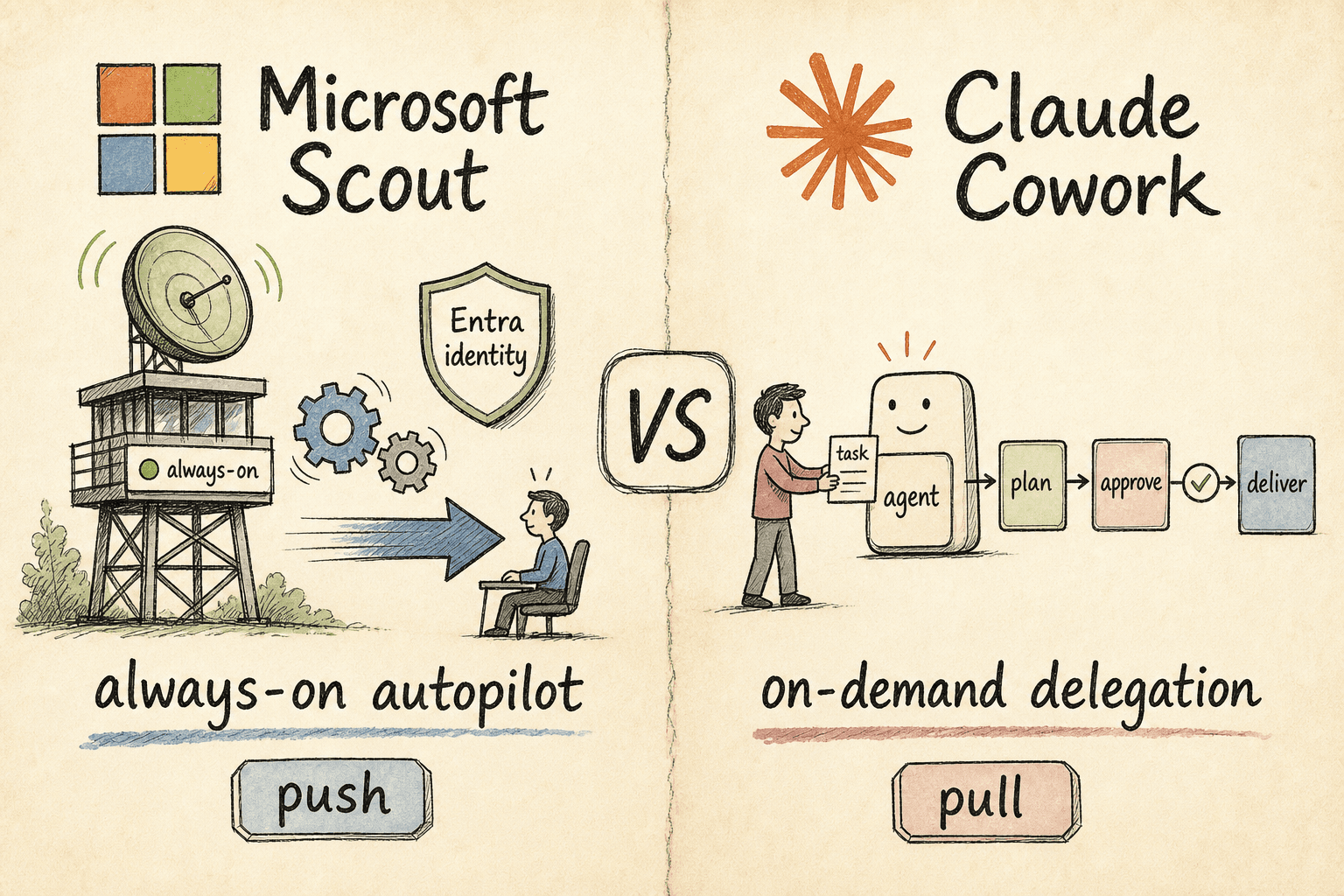
Zwei der größten Agenten-Launches 2026 setzen auf gegensätzliche Wetten. Microsoft Scout ist ein Desktop-Autopilot, der im Hintergrund läuft und in Ihrem Auftrag handelt; Claude Cowork wartet, bis Sie ihm eine Aufgabe übergeben, und liefert dann. Eines ist Push, das andere Pull — hier erfahren Sie, was zu Ihrem Team passt.

Microsoft Copilot Cowork vs. Claude Cowork: Das geliehene Gehirn
Thomas hatte den Tab seit vierzig Minuten offen, ohne ein einziges Wort getippt zu haben. Auf einem Bildschirm: Microsoft Copilot Cowork, an diesem Morgen angekündigt. Auf dem anderen: Claude Cowork, das er seit sechs Wochen still testete. Beide laufen auf Claude. Beide behaupten, dasselbe zu tun. Der Unterschied liegt im Container – und der Container entpuppt sich als die eigentliche Entscheidung.
Microsoft Copilot Cowork vs. Claude Code: Die zwei Etagen, die niemand automatisierte
Felix ist CTO und beobachtet, wie seine Ingenieure Pull Requests mit Claude Code liefern — und liest gleichzeitig Microsofts Copilot-Cowork-Ankündigung. Seine VP of Operations möchte wissen: Soll das gesamte Unternehmen wechseln? Die Frage ist falsch. Es gibt zwei Etagen. Es gibt zwei Tools.