AI Search Blog Optimiser for Claude Cowork
Give the plugin a company blog URL. It indexes the blog with Crawl4AI MCP, reads Peec MCP data, learns and reuses the brand voice, creates GEO recommendations, and uses a writer agent to turn existing posts into optimised articles.
Last updated 26 April 2026. Built for Peec-backed regular GEO blog optimisation with Crawl4AI MCP.
Use the plugin yourself on AI Heroes, or ask Schmitdy to map the first AI-search gaps before you run it.
TL;DR
A repeatable AI-search optimisation loop for owned content
Most company blogs were written for Google search, not for AI answers, citations, and prompt-shaped buyer questions. AI Search Blog Optimiser helps product marketers, SEO teams, SEO/GEO agencies, and content leads migrate existing owned content forward into GEO.
It turns manual AI-search research and rewriting into a repeatable optimisation loop: review owned content every 2-4 weeks, identify which posts are falling behind competitors or missing from AI answers, and refresh the pages that can win back visibility.
The impact is practical: improve 40, 50, or 100 existing articles with the same evidence-led process so the blog stays current with the category, what is working for the brand, and what is working for the competition.
Get the Plugin
Enter your email to download the Claude Cowork plugin file and get access to the GitHub repository.
No spam, ever. Your email is stored securely so we can send you updates about new use cases and workflows.
Need signal before setup?
Request Free AI Search Audit
If you want the fastest path to a useful first run, Schmitdy can review your blog and target category, then show where the brand appears, which competitors are winning, and which articles are worth refreshing first.
Problem
What Problem Does This Solve?
Most company blogs were written for Google search, not for AI answers, citations, and prompt-shaped buyer questions. AI Search Blog Optimiser is for product marketers, SEO teams, SEO/GEO agencies, and content leads who need to migrate existing owned content forward into GEO and keep blog posts visible in AI search.
Instead of manually checking ChatGPT, Perplexity, Gemini, Claude, and Google AI results, inspecting where the brand appears, which competitors are mentioned instead, which sources AI engines trust, and what each article is missing, the plugin turns that manual research and rewrite loop into a repeatable workflow.
It helps teams refresh existing articles so the blog stays current with the category, what is working for the brand, and what is working for the competition.
The questions teams have to answer
- Are we mentioned when buyers ask ChatGPT or Perplexity about our category?
- Which competitors are being cited instead?
- Which third-party pages are AI engines trusting?
- What structure or semantics do those cited pages have that our article is missing?
- Can we improve our existing blog post instead of commissioning a new one?
Why it breaks manually
10-100+
Doing this for one or two posts is manageable. Across a real blog, it becomes a dynamic system that has to keep improving every week and month as the category and market move.
The manual workflow being replaced
Doing this manually is slow. The work usually looks like this before the optimiser automates the upstream research, recommendation, rewrite, and handoff stages.
- 1Run buyer prompts across ChatGPT, Perplexity, Google AI Overview, Gemini, Claude, and Copilot.
- 2Capture which brands appear and which sources get cited.
- 3Open competitor pages and top-cited editorial pages.
- 4Compare structure, schema, FAQ coverage, trust signals, evidence, and phrasing.
- 5Decide what the article is missing.
- 6Turn that into a digestible recommendation list.
- 7Hand it to a writer or product marketer.
- 8Rewrite the article.
- 9Check that the rewrite added the TL;DR, evidence, links, schema, FAQ, trust block, and prompt-shaped sections.
- 10Repeat every few weeks as category language, product claims, competitors, and AI engine citations change.
AI Search Blog Optimiser automates the upstream work: crawling your pages, reading Peec research, comparing against competitor and top-cited pages, generating recommendations, and then passing those recommendations into a writer agent that creates the optimised article.
It is a workflow for repurposing what you already own.
Workflow
How does AI Search Blog Optimiser work?
You give the Claude Cowork plugin a blog URL and a Peec project ID.
It crawls the blog, extracts a reusable site-level brand voice, reads Peec MCP data on visibility gaps, competitors, cited sources, sentiment, and prompts, then generates evidence-grounded recommendations. Run it in batches of 5-10 articles when you want a focused review, or run larger batches when you are ready to work through the whole blog.
A writer agent turns those recommendations into GEO-optimised article packages with answer-first TL;DRs, prompt-shaped headings, trust blocks, semantic structure, internal links, FAQ/schema coverage, inline evidence, markdown, HTML, standalone schema, diffs, handoff notes, and a quality manifest ready for your content team to review and integrate.
| Stage | What happens |
|---|---|
| Crawl the blog | Discover article URLs from the blog index and save source content for each post using Crawl4AI MCP. |
| Extract brand voice | Build a reusable site-level voice baseline from the existing articles so rewrites keep the brand's language, product framing, caveats, and rhythm. |
| Read Peec MCP gaps | Pull tracked prompts, AI engine visibility, share of voice, sentiment, cited domains, source gaps, response excerpts, and Peec action opportunities. |
| Build evidence | Collect the claims, sources, reviewer signals, and internal links the rewrite is allowed to use. |
| Generate recommendations | Create a practical optimisation plan covering TL;DR, prompt-shaped headings, missing claims, source-backed evidence, internal links, FAQ/schema, trust blocks, and engine-specific tactics. |
| Create the optimised article | Pass the original article and recommendations into a writer agent that produces a GEO-optimised article package with answer-first copy, semantic structure, internal links, FAQ/schema coverage, and inline evidence. |
| Check the package | Confirm schema, FAQ coverage, evidence, trust signals, links, recommendation coverage, quality gate status, and the handoff assets your content team can review and integrate. |
Brand voice memory
The rewrite uses the site's voice, not generic AI copy.
Before the writer agent drafts, the plugin extracts a reusable voice baseline from the original blog. Later runs reuse that baseline so refreshed articles keep the company's product language, caveats, tone, and proof style while adding Peec-backed GEO structure.
- recurring product language
- sentence rhythm and article structure
- preferred proof points and caveats
- terms the brand uses or avoids
- handoff notes for later batches
Install
How do you add the plugin to Claude Cowork?
Keep the same drag-and-drop install flow as the other AI Heroes Cowork plugins. After upload, connect Peec MCP so the optimiser can read live AI visibility data, then connect local Crawl4AI MCP so the plugin can crawl pages on your Mac.
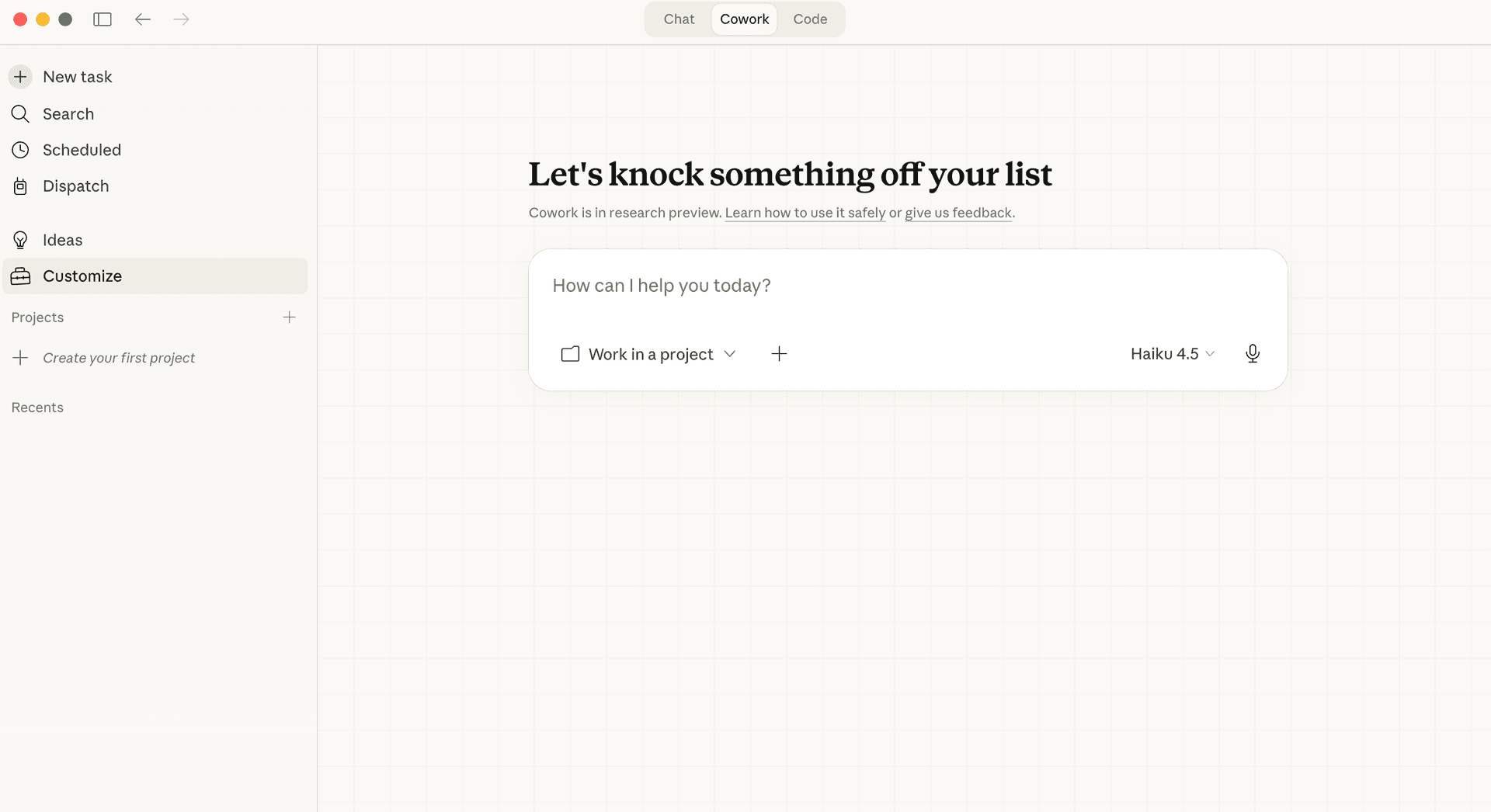
Open Customise
Open Claude Desktop or Cowork, then choose Customise from the app menu.
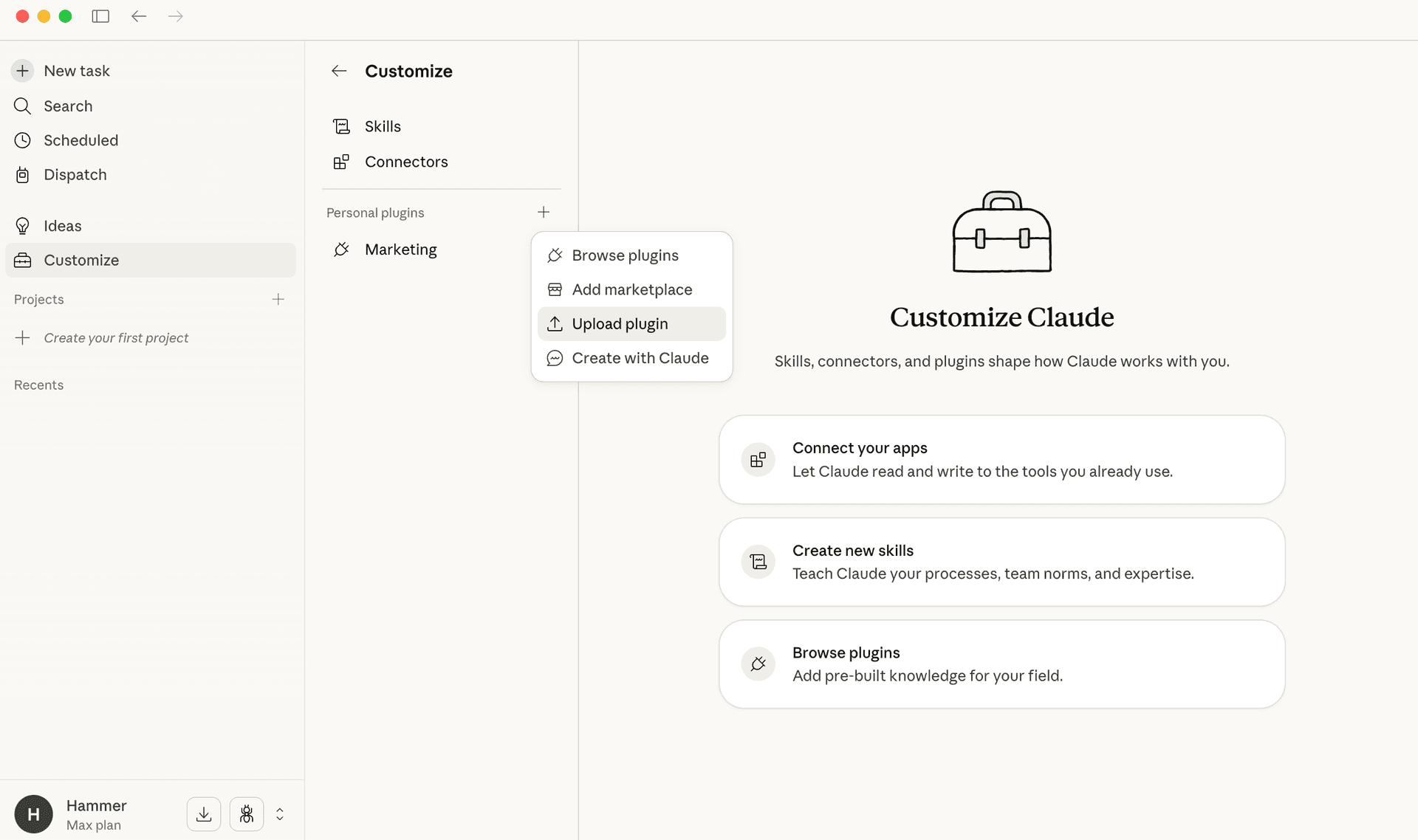
Upload the plugin zip
Select the AI Search Blog Optimiser zip you downloaded from this page.
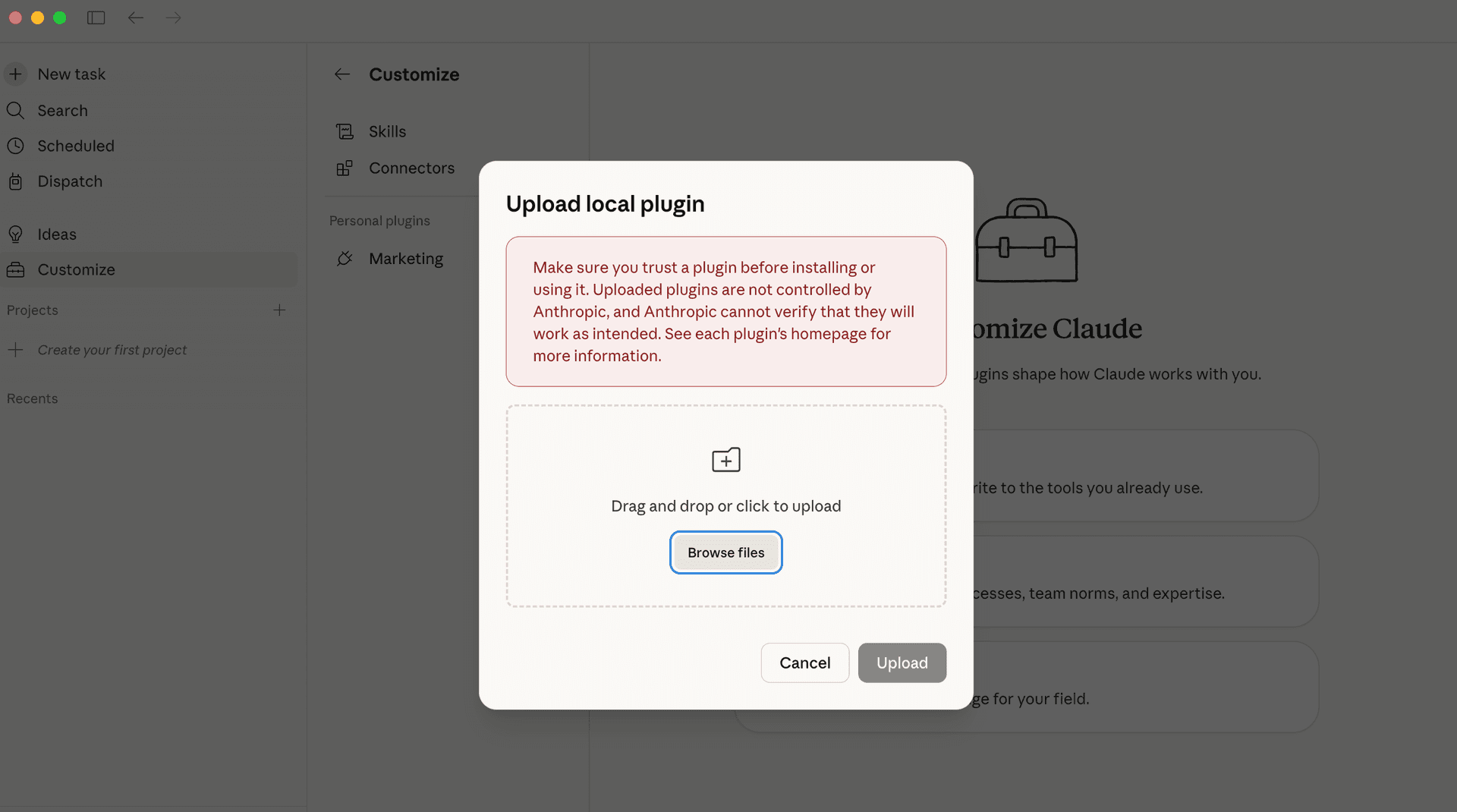
Drag, drop, and enable
Drop the zip into the plugin uploader, enable it, then connect Peec MCP and Crawl4AI MCP before your first run.
Connect Peec MCP
Add the Peec MCP server to Claude Cowork with Streamable HTTP transport, then sign in through Peec OAuth when prompted.
https://api.peec.ai/mcpThe plugin expects a Peec project with an own brand, competitors, tracked prompts, and at least one day of Peec data. That evidence is what turns the workflow from generic SEO advice into article-specific GEO recommendations.
Install Crawl4AI MCP locally
Crawl4AI MCP works with this plugin. On Mac, install Docker Desktop, start the Crawl4AI container, confirm the local SSE endpoint is available, then add it to Claude Desktop or Cowork before running the plugin.
http://localhost:11235/mcp/sse
docker run -d \
  -p 11235:11235 \
  --name crawl4ai \
  --shm-size=1g \
  unclecode/crawl4ai:latest
For Claude Desktop or Cowork on Mac, use a local stdio bridge such as mcp-remote in the MCP JSON config rather than adding localhost as a cloud remote connector. This requires Node/npm for npx and keeps the local Crawl4AI server available to the desktop app at the same time as the plugin.
{
  "mcpServers": {
    "c4ai-sse": {
      "command": "npx",
      "args": ["-y", "mcp-remote", "http://localhost:11235/mcp/sse"]
    }
  }
}
For Claude Code, add the same local Crawl4AI SSE endpoint with `claude mcp add --transport sse c4ai-sse http://localhost:11235/mcp/sse`.
claude mcp add --transport sse c4ai-sse http://localhost:11235/mcp/sseQuick Start
How do you run the first optimisation?
After Claude Cowork has the plugin, Peec MCP, and Crawl4AI MCP connected, run the Granola example to see the full dashboard, recommendations, brand-voice reuse, and generated article packages.
/blog-optimiser https://www.granola.ai/blog --max-articles 2/blog-optimiser https://your-company.com/blog --max-articles 10What happens after you run it
- the dashboard opens for the run
- the blog index is crawled
- the plugin pulls article content through Crawl4AI MCP
- brand voice is generated and saved for reuse in later runs
- Peec data is used to find where the brand is missing in AI answers
- competitor and top-cited source patterns are used to shape the recommendations
- recommendations are passed to a writer agent to create an optimised article
- you get markdown, HTML, schema, diff, handoff notes, and a quality manifest
Granola Example
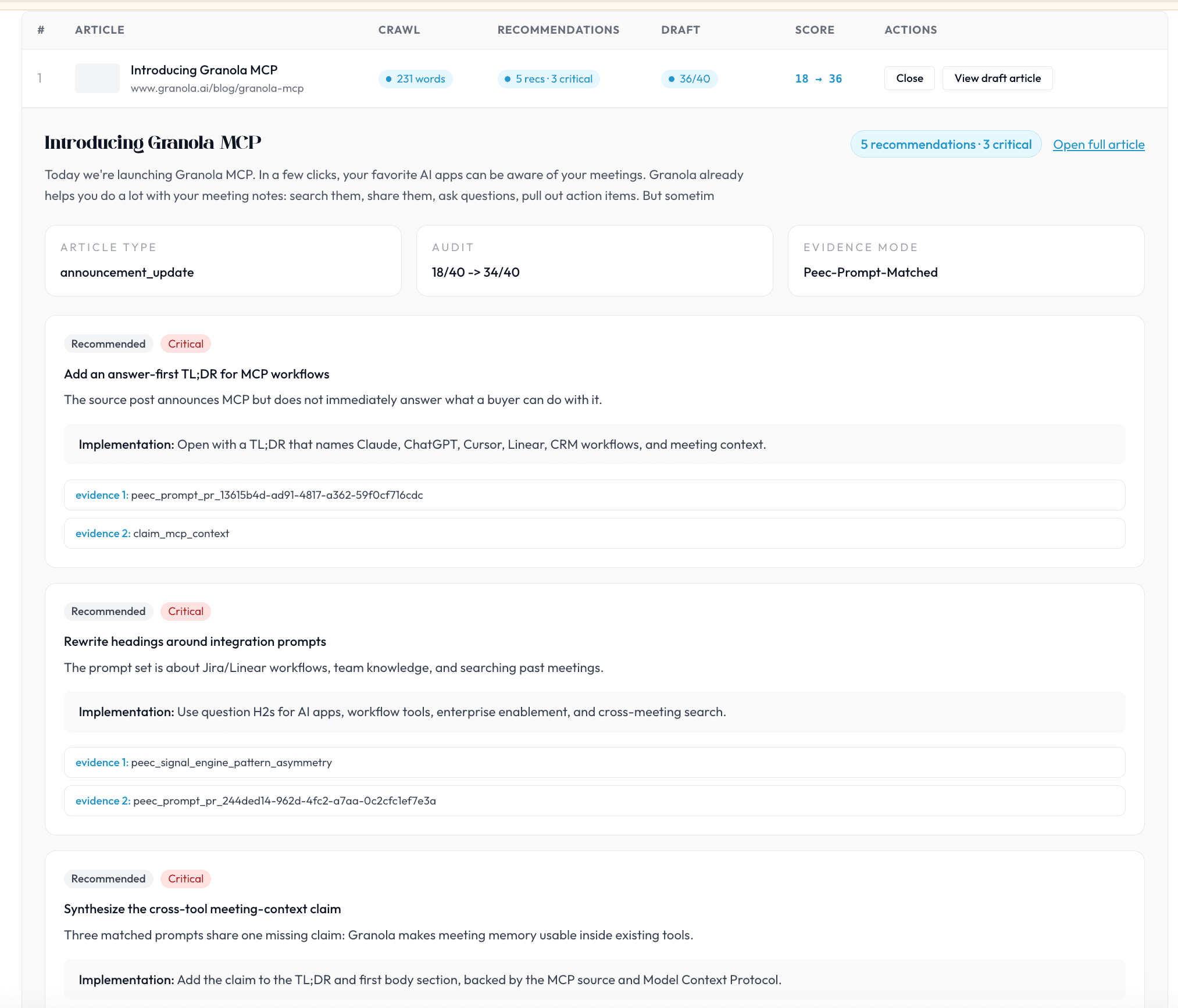
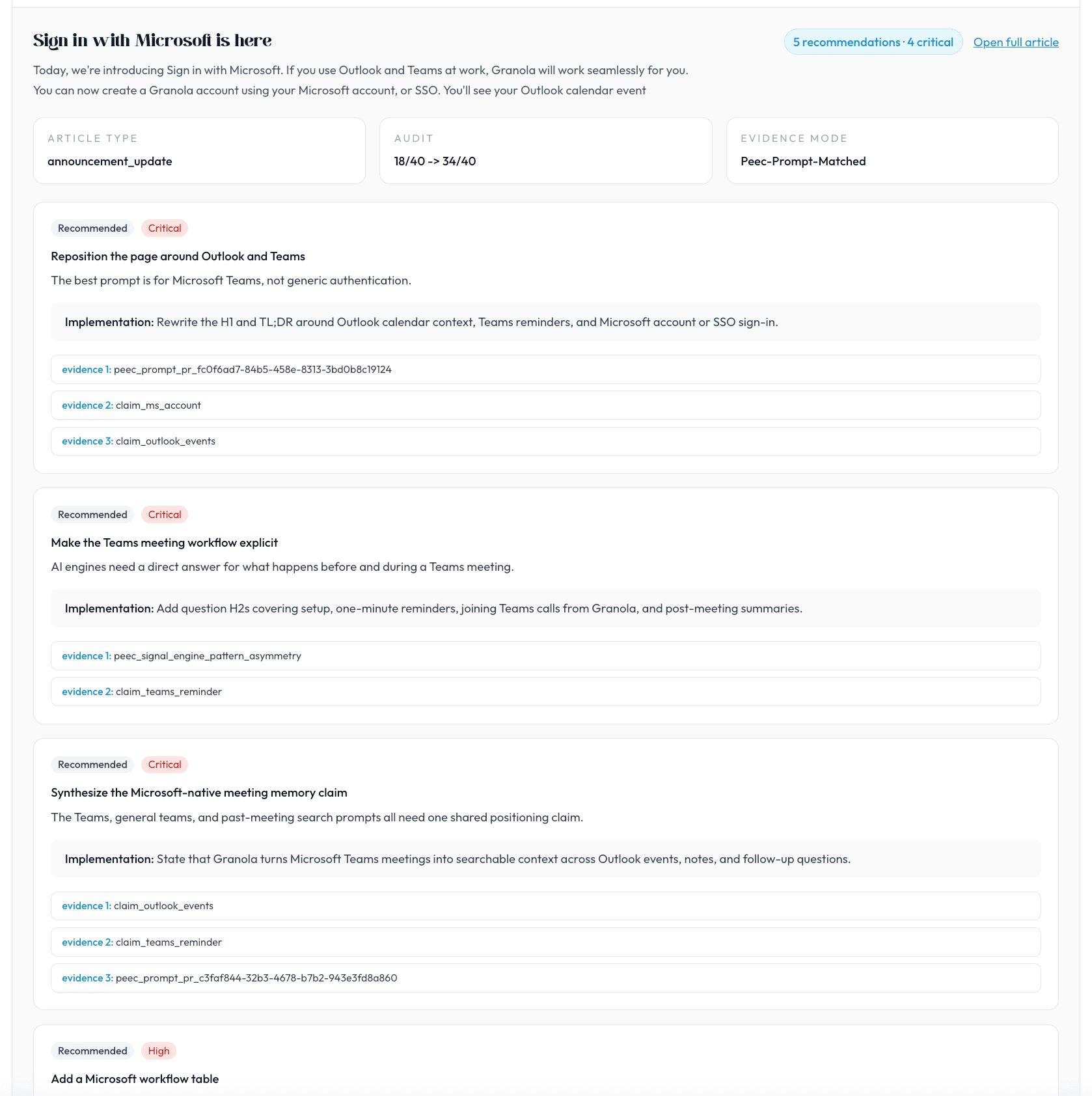
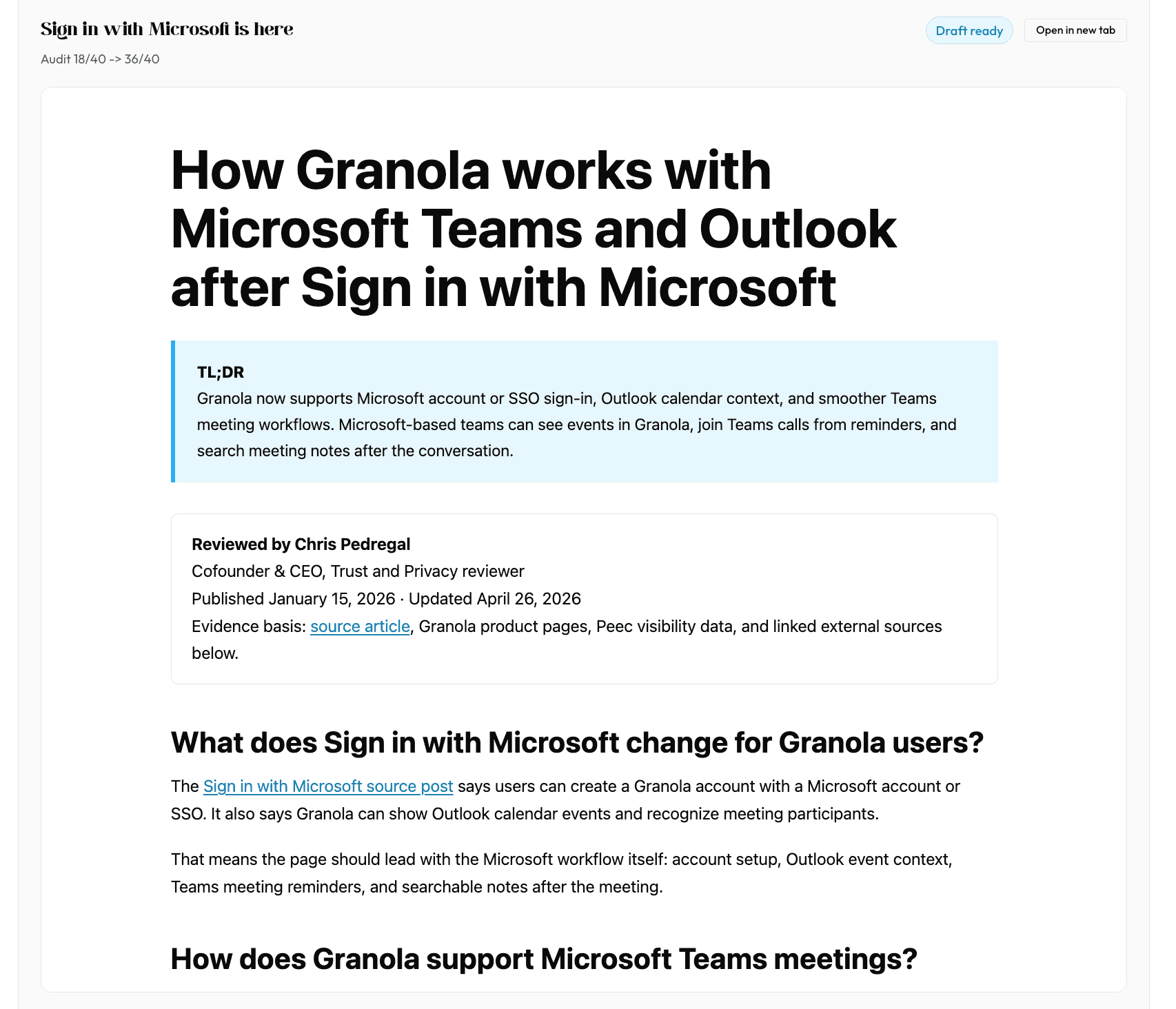
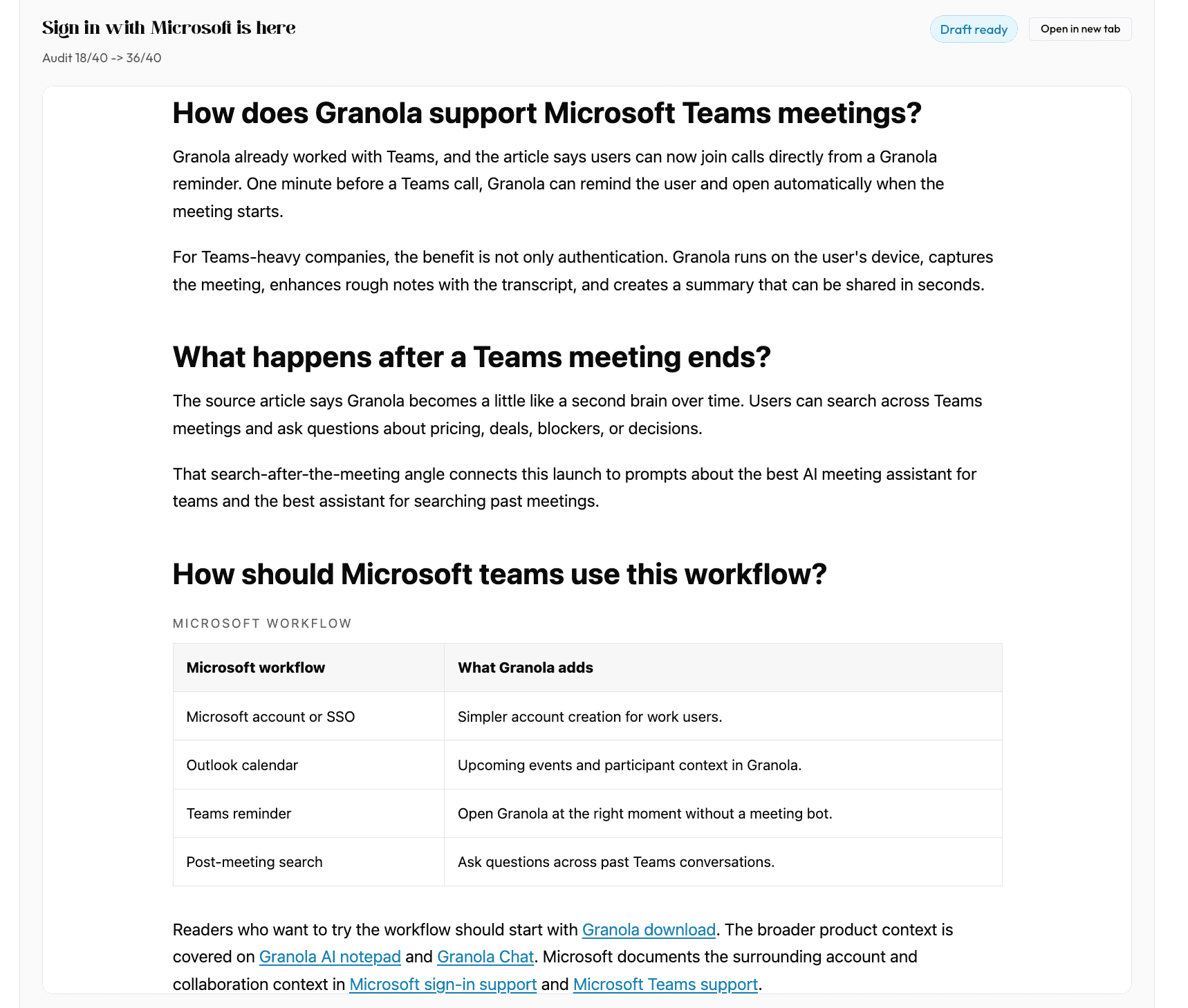
The example run used two Granola posts: Introducing Granola MCP and Sign in with Microsoft is here. Each maps to a real GEO prompt family: AI app integrations and workflow context, then Microsoft Teams and Outlook adoption.
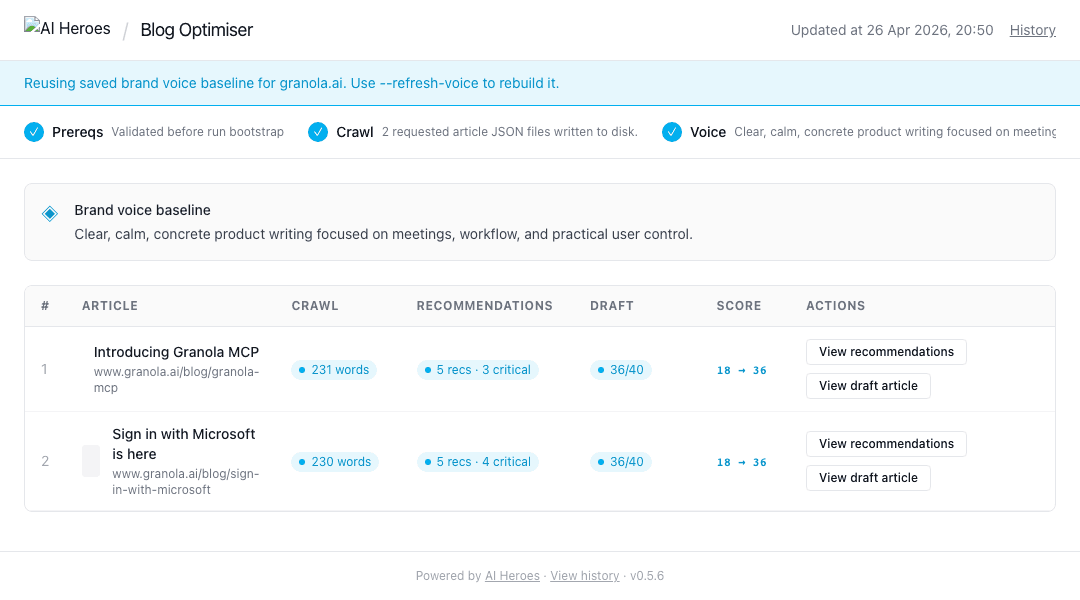
Recommendations with Evidence
The recommendation agent turns Peec gaps into specific article changes. The key is that the recommendations include evidence handles and implementation language, not just generic content advice.
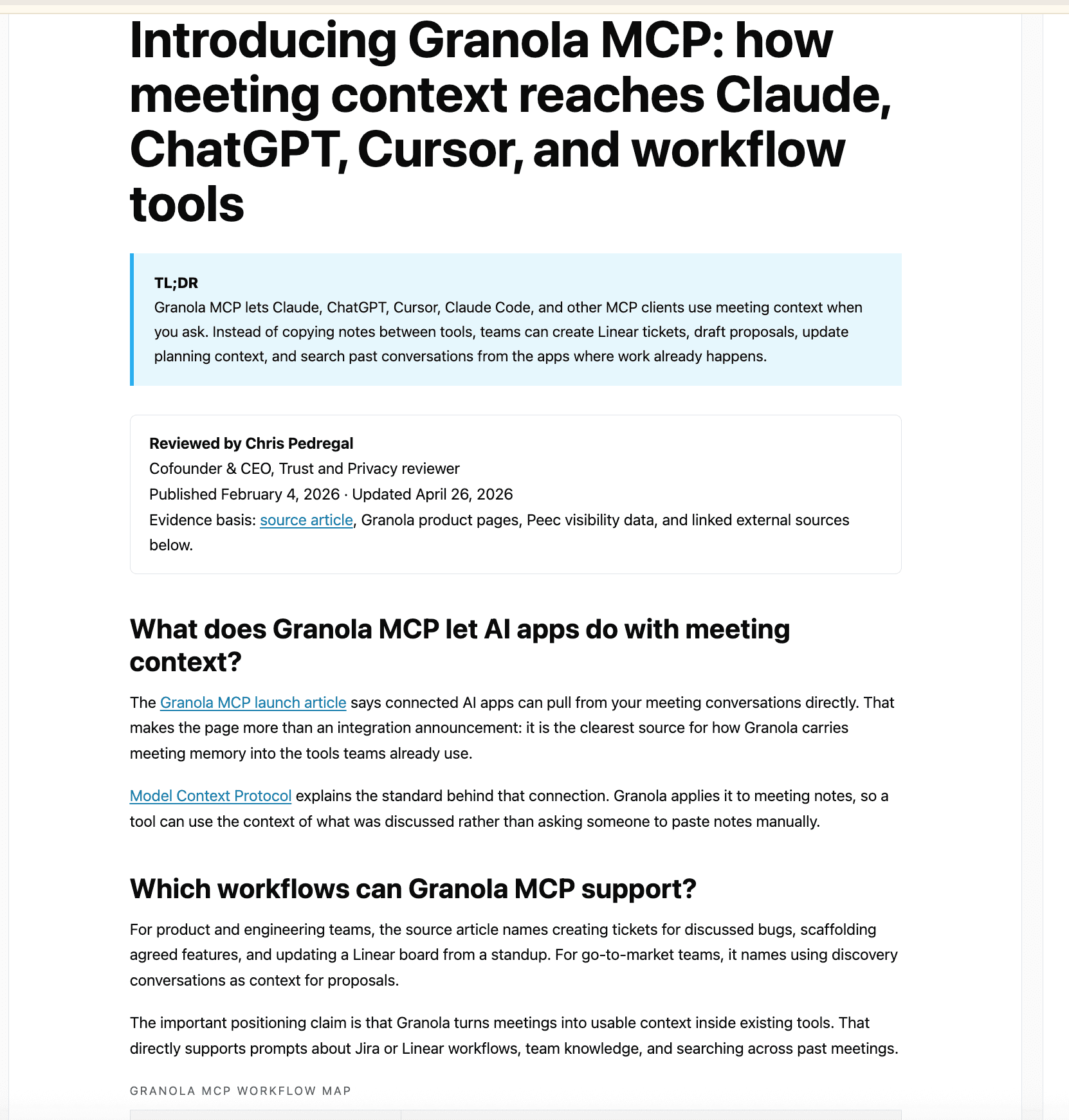
Generated Article Packages
The workflow does not stop at recommendations. The writer agent combines the original article, the extracted brand voice, and Peec-backed recommendations to create GEO-optimised drafts with answer-first TL;DRs, trust blocks, prompt-shaped headings, semantic structure, inline evidence, internal links, FAQ/schema coverage, and quality gate status.
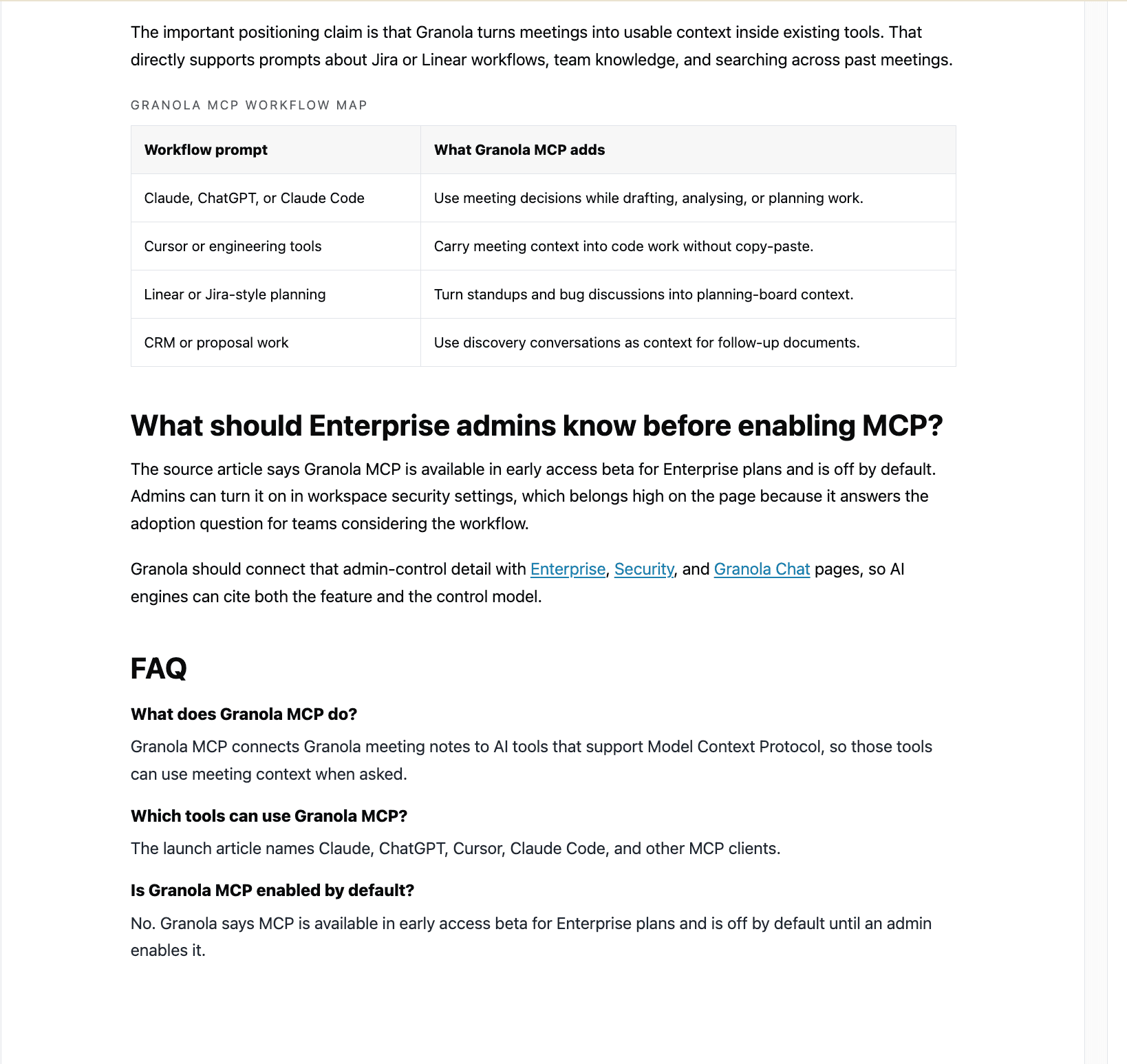
What do you get back for each article?
For each article, the workflow returns:
Regular GEO Blog Optimisation
Owned content is not static in AI search. The article that wins today can lose ground when a competitor publishes a stronger comparison page, updates a product claim, adds fresher evidence, earns a citation from a trusted source, or starts appearing more consistently across the same prompts your buyers ask.
That is why the sweet spot is usually a 2-4 week optimisation cycle. It is frequent enough to catch movement in Peec visibility, competitor presence, cited domains, sentiment, and source gaps, but not so frequent that teams rewrite pages before there is enough signal to learn from.
This workflow lets a product marketer or content lead run the same process every 2-4 weeks:
- 1Crawl the blog.
- 2Reuse the saved brand voice.
- 3Pull fresh Peec visibility, competitor, source, sentiment, and action data.
- 4Find which owned posts are missing, stale, under-structured, or being beaten by competitor pages.
- 5Generate recommendations for the next batch of 5-10 articles.
- 6Let the writer agent turn those recommendations into optimised articles.
- 7Send markdown and handoff notes to the content team.
That is the core value: not a one-off audit, but a repeatable owned-content optimisation loop that keeps your blog aligned with how the category, your brand, and competitor visibility are moving.
FAQ
AI search blog optimisation: frequently asked questions
How the free AI Search Blog Optimiser helps product marketing, SEO, and GEO teams keep blog posts they already own visible and cited across ChatGPT, Perplexity, Google AI Mode, Gemini, and Copilot.
It is the work of rebuilding existing blog posts so AI engines retrieve and cite them when buyers ask a question. Also called generative engine optimisation (GEO), it restructures a page around answer-first summaries, prompt-shaped headings, evidence, and schema. The AI Search Blog Optimiser is a free Claude Cowork plugin that does this on a blog you already own.
Point the plugin at your blog URL and an AI-visibility project. It crawls each post, learns your brand voice, reads where AI engines cite competitors instead of you, then a writer agent rebuilds the post with an answer-first TL;DR, prompt-shaped headings, inline evidence, internal links, and FAQ schema. You review the package before anything goes live.
SEO earns a ranking in a list of links. GEO (AI search optimisation) earns a citation inside an AI-generated answer. They overlap, but AI engines reward answer-first structure, extractable sections, clear sourcing, and schema more than keyword density alone. The optimiser rebuilds Google-era posts for the way AI engines now read and cite content.
Yes, that is the entire point. Rather than commissioning new content, the optimiser refreshes the 40, 50, or 100 posts you already own, so each one is restructured for AI answers, citations, and the longer, more specific questions buyers now ask AI engines.
You need live visibility data, not guesses. The optimiser reads tracked buyer prompts, brand visibility, share of voice, competitor mentions, and the sources AI engines cite, then targets the articles where you are missing from the answer. If you do not have that data yet, Schmitdy can run a free AI Search Audit to map your first gaps.
No coding is required. You install it like any Claude Cowork plugin, connect the data sources once, and run a single command. It never publishes automatically: you get review-ready outputs (markdown, HTML, embedded schema, an editorial diff, handoff notes, and a pass or block quality manifest) that your team checks and publishes through your own blog template.
Every two to four weeks works for most teams. AI answers shift as competitors publish, product claims change, and engines update which sources they trust, so a regular loop keeps your strongest posts visible. A one-off refresh goes stale, which is why this is built as a repeatable optimisation cycle rather than a single audit.
The plugin is free and open source: download it, connect your data, and run it yourself. If you would rather start with expert signal, Schmitdy can run a free AI Search Audit that shows where you appear, which competitors win, and which articles to refresh first, then optimise alongside your team.
Publishing handoff
What does the content team actually publish?
The plugin does not push directly into your CMS. It gives the team a review-ready article package: the page body, schema, QA record, editorial diff, and publisher notes needed to move from Peec insight to a website update without losing evidence or context.
HTML preview
A styled review surface for checking the final article structure, TL;DR, trust block, evidence placement, tables, FAQ, links, and embedded schema before anything reaches the CMS.
Markdown body
The clean article body for CMS editors, content teams, or developers who want to move the rewrite into the website's existing blog template.
Handoff notes
Publisher-facing notes that separate what should appear on the page from off-page actions, implementation reminders, and follow-up work.
Schema JSON
A standalone structured-data package so the CMS owner can add or validate JSON-LD without digging through the preview HTML.
Editorial diff
A clear explanation of what changed from the source article and why the rewrite better matches AI-search demand.
Quality manifest
The QA record showing whether the article passed, which GEO modules were implemented, and what still blocks publication if the draft is not ready.
Recommended handoff bundle
Use the markdown body for the CMS article, the handoff notes for the publisher, the schema JSON for structured data, and the manifest as the final pass/block QA record. The HTML preview remains the best copy-review view, but the website should usually publish the content through its own blog template rather than reuse the plugin preview styling.
Ready to turn Peec insights into AI-search rewrites?
Download the free v0.7.0 plugin, connect Peec MCP, and crawl with local Crawl4AI MCP before running your first evidence-grounded blog optimisation workflow.
Download the free pluginRequest Free AI Search Audit