Travel Agent for Claude Code. One Conversation Replaces 14 Tabs.
Most travel tools search. This one knows you and thinks. It learns your preferences, reasons across constraints like family setup, loyalty programmes, timing, and budget, then gives you an opinion with the reasoning behind it. Not a search wrapper. A travel judgment system.
Built as a Claude Code plugin with MCP connections to Google Flights, Airbnb, and transport APIs. Install from the command line, clone from GitHub, or upload via the desktop app. Set up your travel profile and it gets sharper with every trip.
How It Works
- 1Install the plugin via CLI, GitHub clone, or desktop app upload
- 2Run /travel-setup to build your travel profile through an interactive questionnaire
- 3Ask a travel question in plain English. The plugin reasons across all your constraints simultaneously.
- 4Get recommendations with clear reasoning, direct booking links, and ongoing price monitoring after you book
Get the Travel Agent
Enter your email to download claude-travel-agent-latest.zip and get access to the GitHub repository.
No spam, ever. Your email is stored securely so we can send you updates about new use cases and workflows.
Current release v2.6.0. Built 5 Apr 2026, 09:42 UTC. Commit af7eb1a.
Installation Guide
Three ways to install. Pick whichever suits you. The plugin is identical regardless of install method.
Install via CLI
RecommendedOne command. The fastest way to get started if you already have Claude Code running.
claude plugin install https://github.com/mlobo2012/claude-travel-agentAfter install, verify with: claude plugin list — you should see travel-agent in the output.
Install via Claude Desktop App
Download the claude-travel-agent-latest.zip file using the download button above, or from the GitHub releases page.
Open Claude Desktop, click your profile icon, select 'Customise Claude', then navigate to the Plugins section.
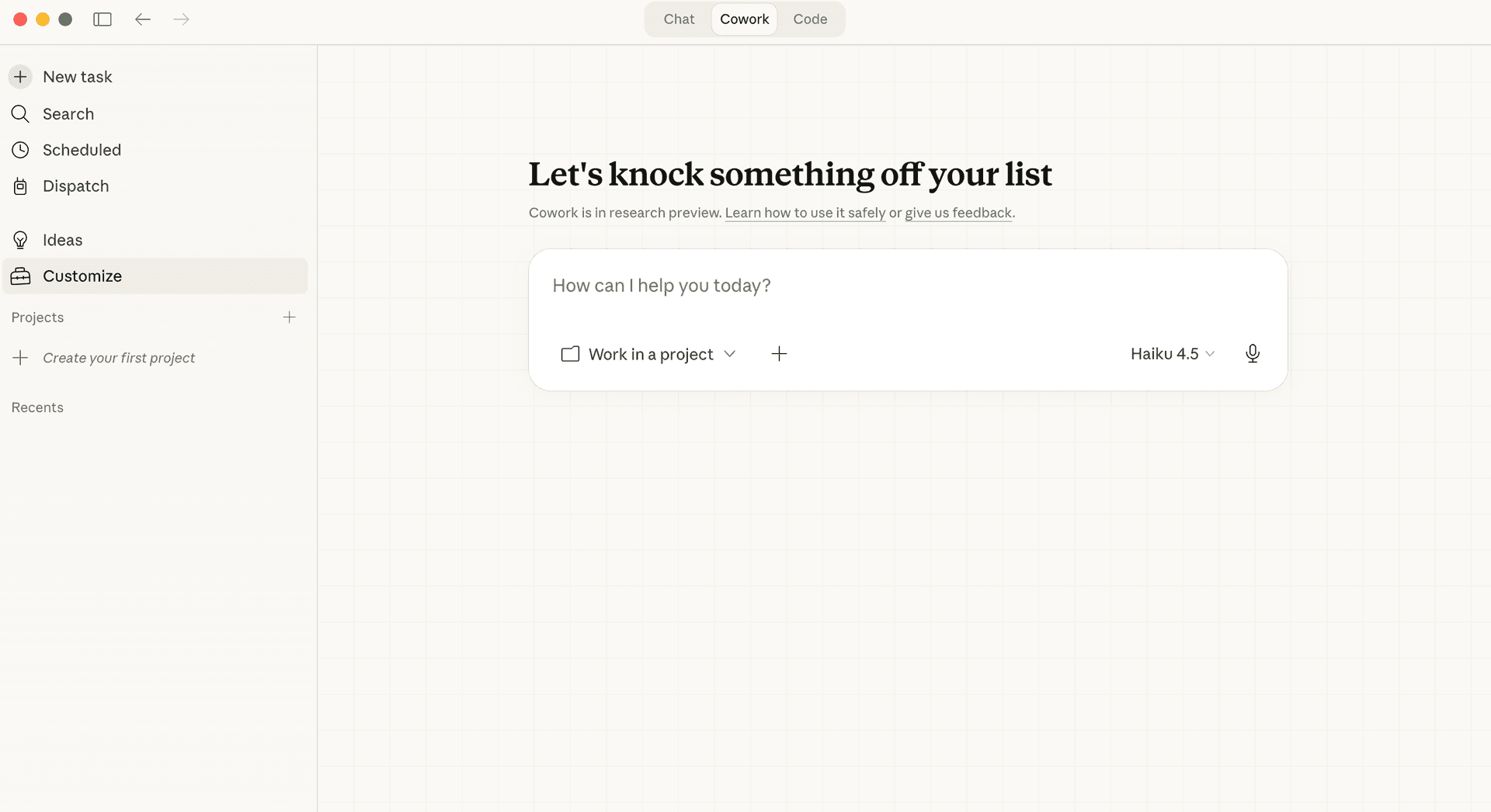
Click 'Upload Plugin' and select the downloaded zip file.
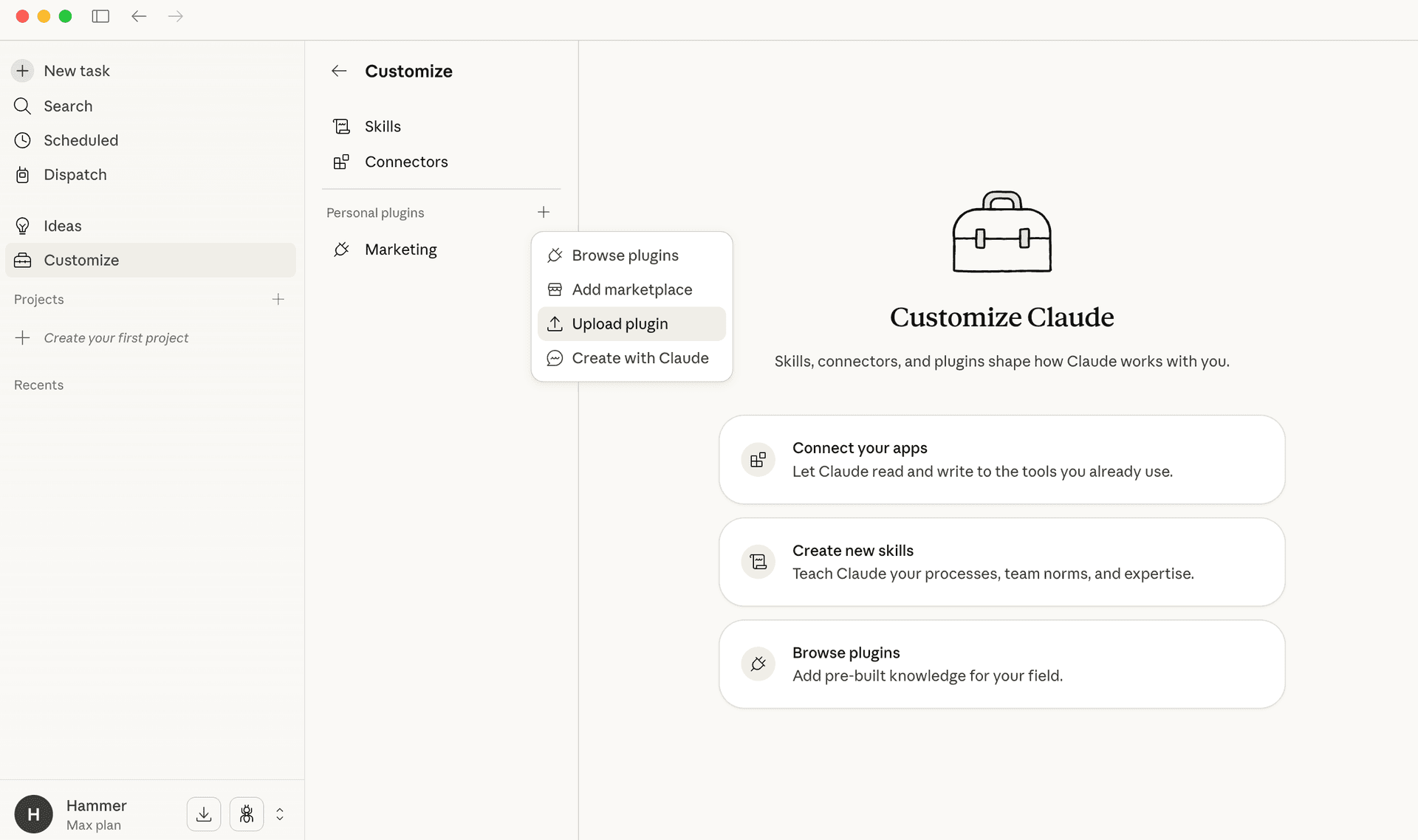
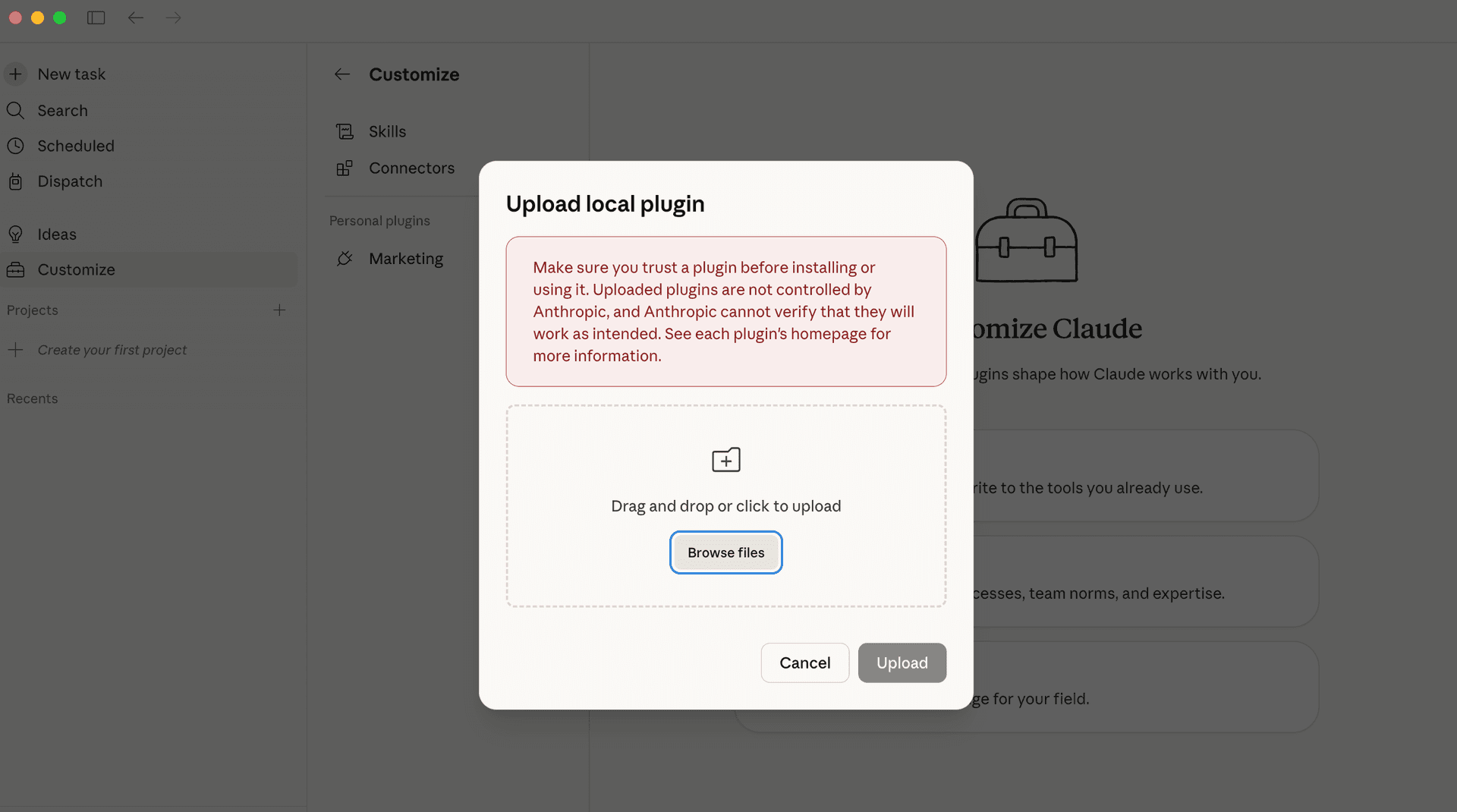
Drag and drop the zip file into the upload area. The plugin will install automatically and connect to flight, accommodation, and transport search APIs.
Clone from GitHub
For developers who want to inspect the source, contribute, or customise the plugin.
git clone https://github.com/mlobo2012/claude-travel-agent && cd claude-travel-agentAfter installing: set up your travel profile
The plugin includes an interactive onboarding flow that builds your travel profile. It asks about your travel style, family setup, loyalty programmes, and preferences through a guided questionnaire. This is what makes it personal.
/travel-setupYou can also skip the questionnaire and just start chatting. Tell the plugin your preferences in plain English and it will save them automatically.
The Onboarding Experience
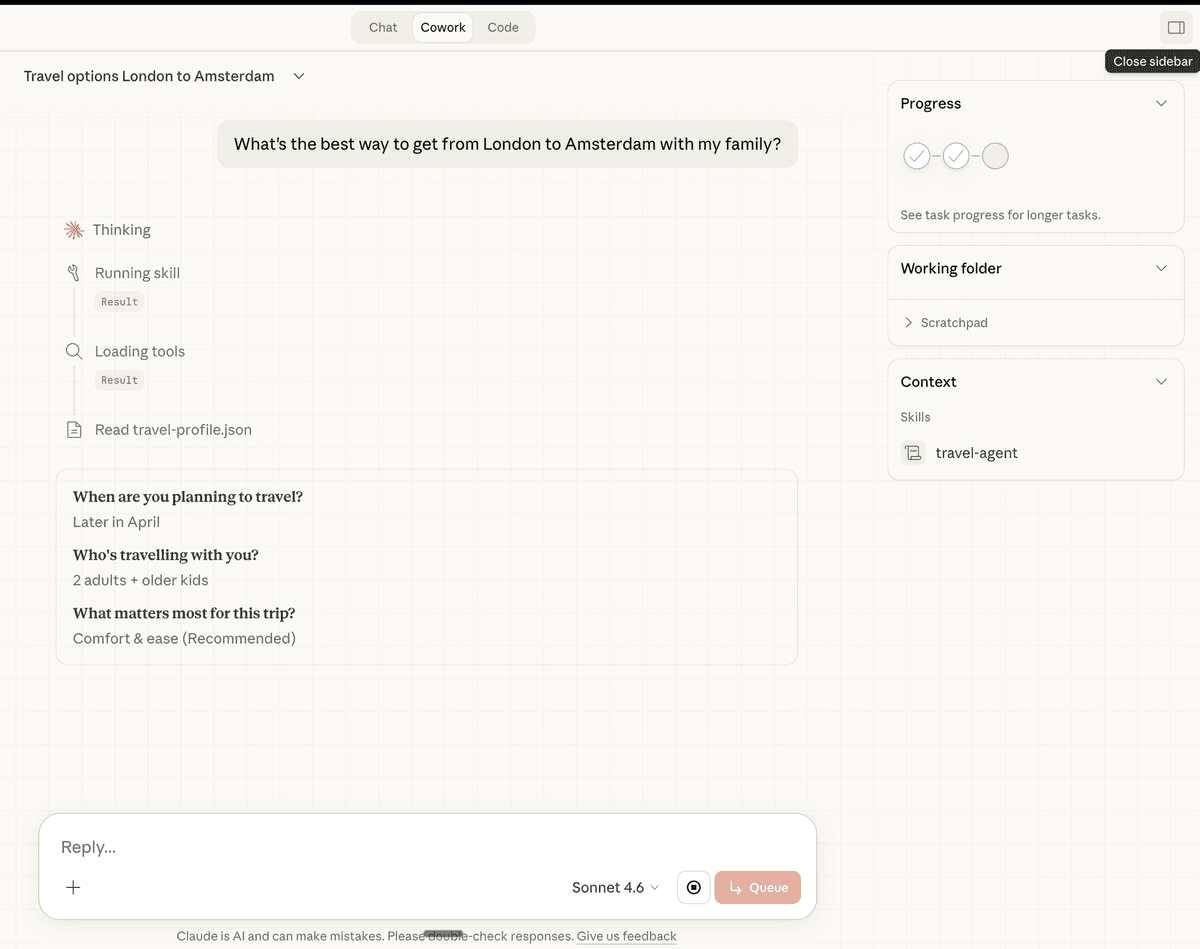
When you run /travel-setup, the plugin walks you through an interactive questionnaire. It asks three questions to understand your trip, then builds your travel profile. You can answer using the numbered options or type freely.
After three questions, the plugin confirms what it understood and starts planning. If you already have a travel profile, it reads your preferences automatically and pre-fills the recommended options — you just confirm or adjust.
The plugin confirms everything it understood before launching searches — nothing gets lost.
Or just type naturally
You do not have to use the questionnaire. Type something like 'I want to go to Trevignano Romano in mid May' directly into the prompt and the plugin will start working immediately. It will ask follow-up questions if it needs more detail.
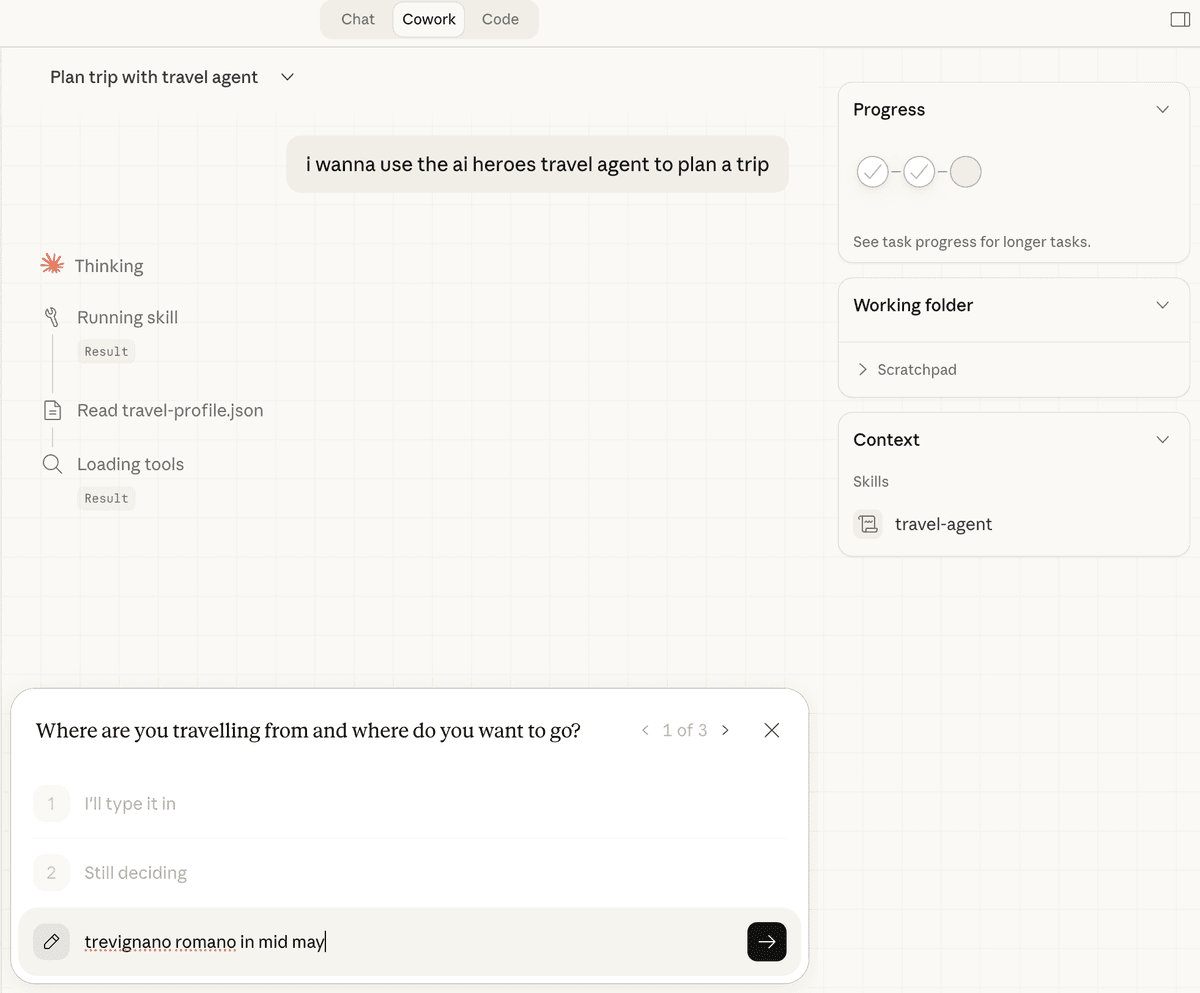
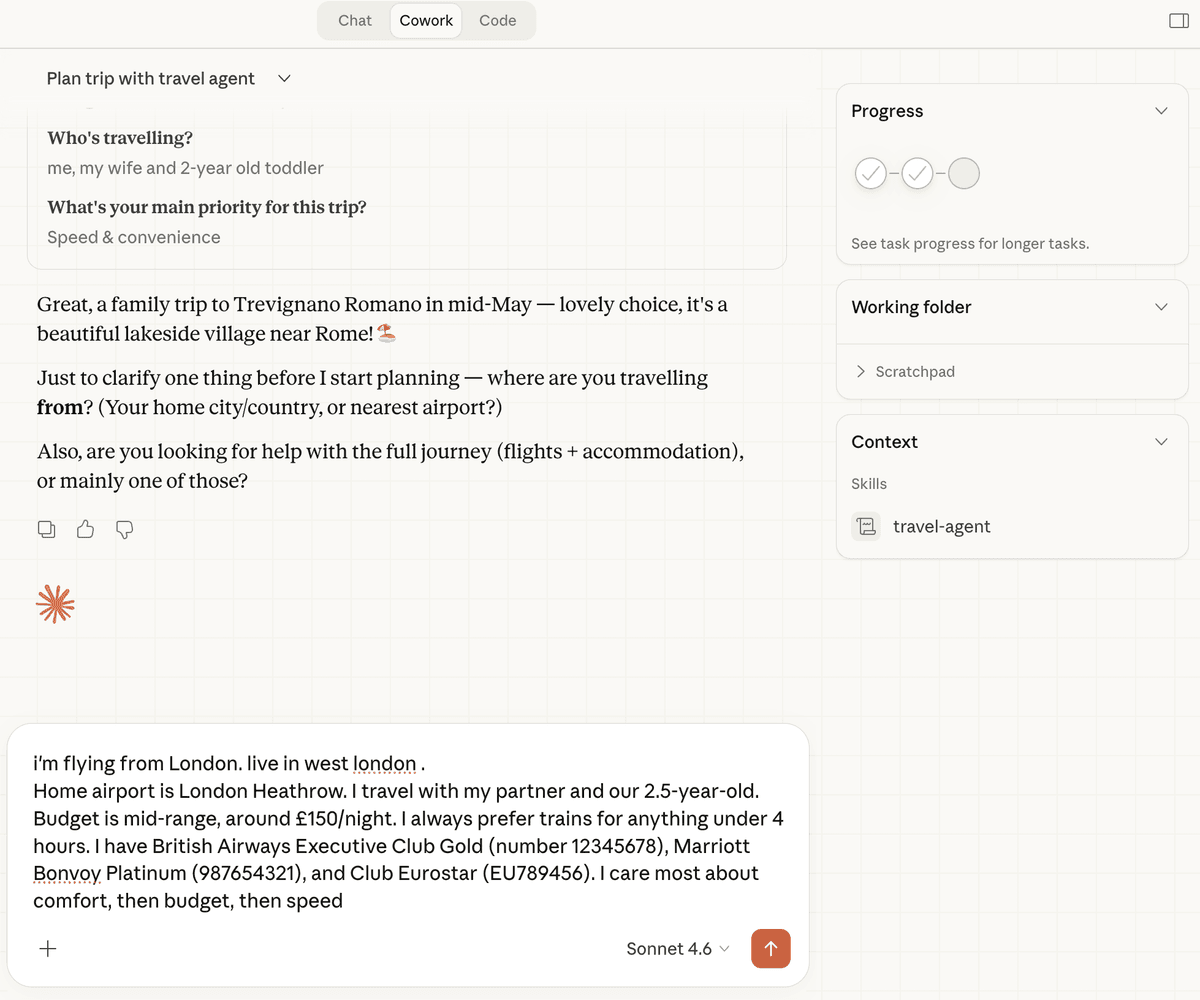
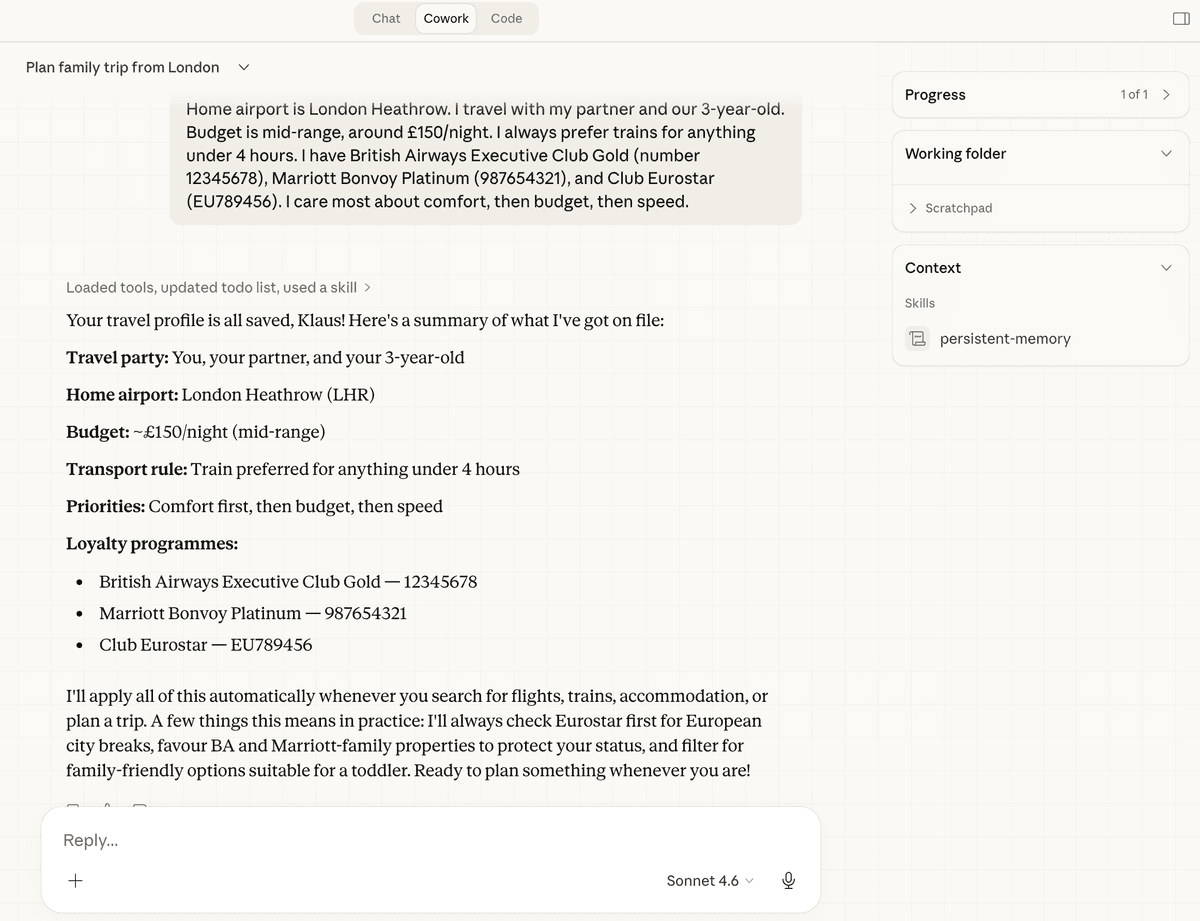
Your profile is saved permanently
The plugin saves your travel profile to Claude's memory. It remembers your home airport, budget range, transport preferences, loyalty programmes, and family setup across every conversation. The more you use it, the less you need to repeat yourself.
What Powers It: MCP Connectors
The plugin connects to external data sources through MCP (Model Context Protocol) servers. These are not cached databases or estimated prices. Every search hits the live source and returns real-time results.
Google Flights
Live flight search across all airlines. Searches by route, flexible date windows, number of passengers. Returns real prices, departure times, airlines, and booking links. Cross-checks multiple airports for your origin and destination.
Airbnb
Live accommodation search with real listings, prices, reviews, and availability. Filters by bedrooms, location, guest count, and dates. Returns direct links to each listing so you can verify and book.
Transport for London (TfL)
Journey planning for London transport connections. Calculates routes from airports to accommodation, local transit options, and station-to-station connections. Used automatically when your trip involves London.
Web Search
Searches the open web for train routes, ferry schedules, local transport options, and activity recommendations. Cross-references multiple sources to verify prices and availability.
Search vs. Judgment
Most travel tools search. They return ten blue links and leave you to figure out the rest. This plugin knows you, thinks across constraints, and explains every recommendation.
What search tools do
- ✗Return hundreds of results with no context
- ✗Force you to compare across 14 tabs and apps
- ✗Ignore your loyalty programmes, family setup, and preferences
- ✗Disappear the moment you book
What this plugin does
- ✓Weighs price against timing, comfort, and your actual constraints
- ✓Recommends transport modes you would not have considered
- ✓Remembers your preferences and gets sharper with each trip
- ✓Monitors prices after booking, tracks loyalty, sends reminders
What It Handles
From initial planning through to the departure lounge. One conversation replaces the overhead of tabs, apps, and decision fatigue.
Flexible Date Intelligence
Scans windows like 'mid May' or 'any weekend in June' and shows the price spread across the full range. Catches the cheapest day combinations you would miss manually, factoring in your constraints like avoiding early morning flights with young children.
Multi-Modal Transport
Thinks hard about whether a train beats a flight. Compares door-to-door time, cost for the full party, luggage hassle, and comfort side by side. People ask about flights and it comes back with 'take the Eurostar' — with the full reasoning in a comparison table.
Accommodation Research
Finds Airbnbs and hotels with the right room sizes, layout, and check-in hours. Gives honest assessments: 'this listing says beachfront but it is a 10-minute drive.' Returns direct booking links for every option.
Loyalty Programme Awareness
Tracks your airline and hotel points, tier progress, and upcoming status thresholds. Factors loyalty into every recommendation — routes through your preferred airline's hub when it helps, flags when a cheaper option would cost you status progress.
Family and Constraint Reasoning
Knows your toddler means no hand luggage juggling, that under-4s travel free on most trains, and that you need space for a pushchair. Factors in room sizes, transfer complexity, and nap schedules.
Post-Booking Intelligence
Sets up scheduled price watches after you book. Monitors for drops, calculates whether rebooking saves money after fees, and alerts you. Sends packing reminders and departure briefings before you travel.
Transport Intelligence in Action
The plugin does not just search flights. It thinks about which transport mode actually makes sense for your trip. Here is a real London to Amsterdam comparison for a family with young children.
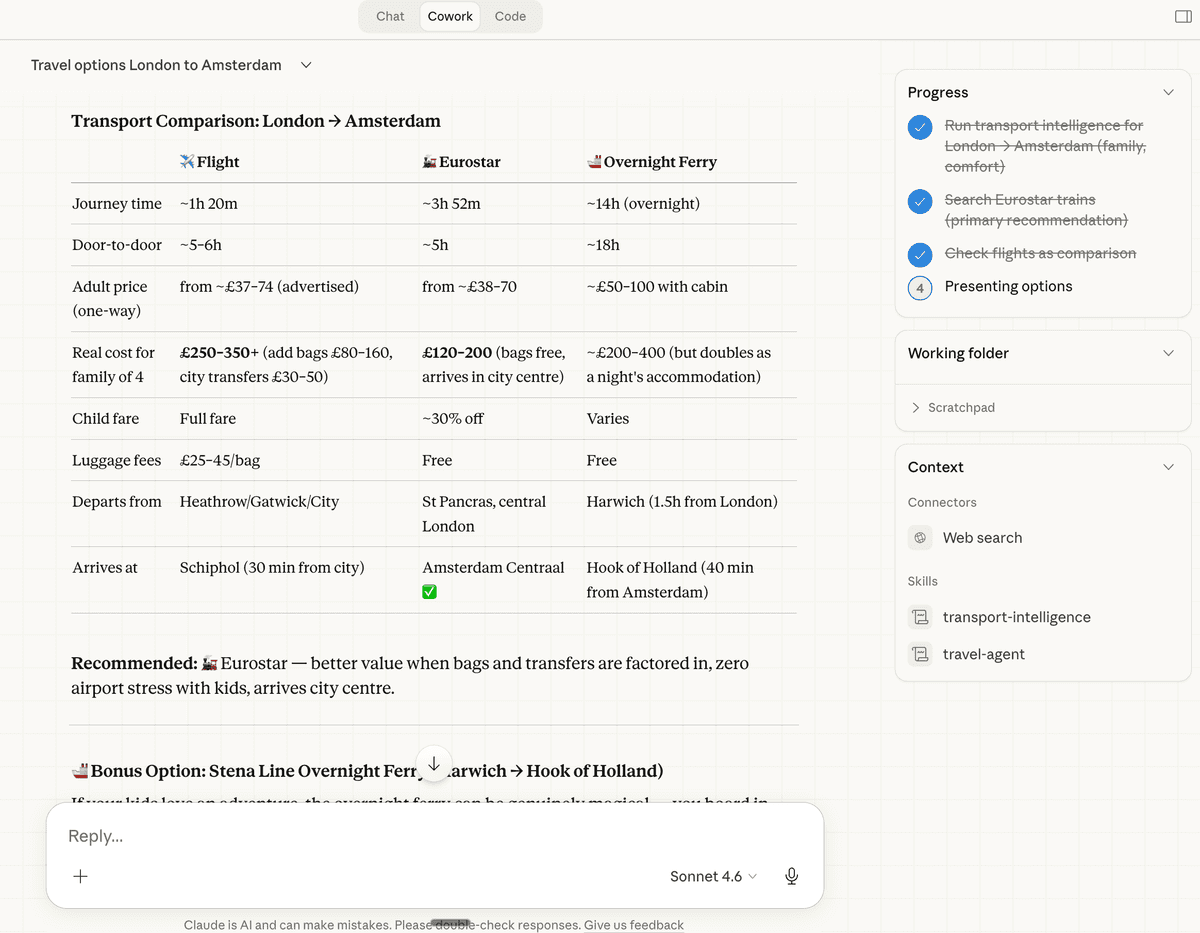
The plugin built this comparison table automatically. Flight, Eurostar, and overnight ferry — side by side with real costs for a family of four, including the hidden extras: bags, child fares, city transfers, and door-to-door time.
It recommended Eurostar: better value when bags and transfers are factored in, zero airport stress with kids, and it arrives city centre. The ferry got a mention as a bonus option — doubles as a night's accommodation.
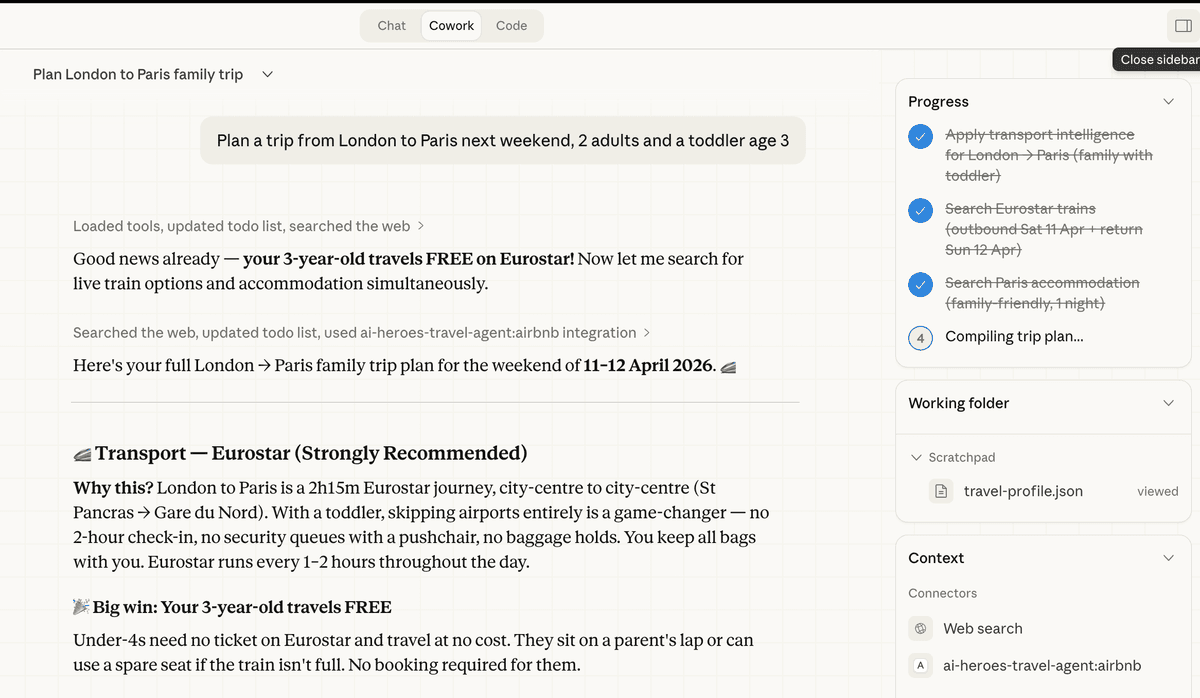
Here is another example: London to Paris with a toddler. The plugin checked flights, then came back with a strong Eurostar recommendation. No security queues, no baggage hold, and children under 4 travel free.
This is what 'transport intelligence' means in practice. It does not just return the cheapest flight. It considers the full picture: your kids' ages, your loyalty programmes, luggage, and total journey stress.
Flights, Accommodation & Trip Planning
When flying is the right call, the plugin searches the full date window, compares options with pricing for your party size, and finds accommodation simultaneously. Here are real results from the plugin.
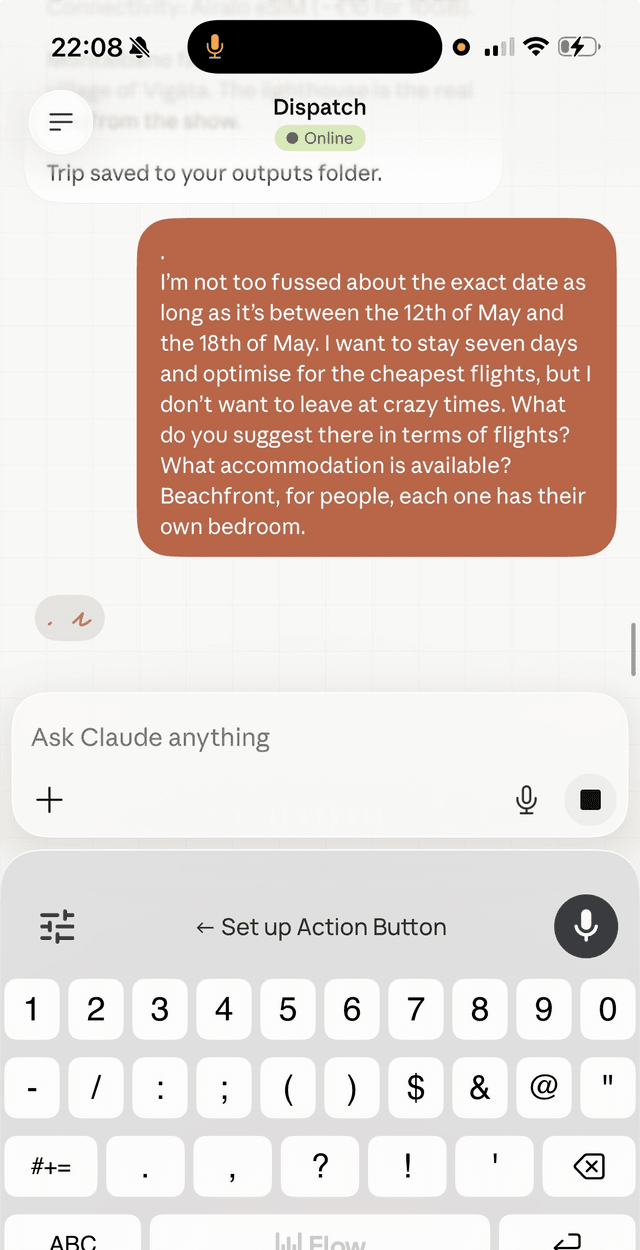
Searching flexible dates on mobile via Dispatch. The same plugin works from your phone.
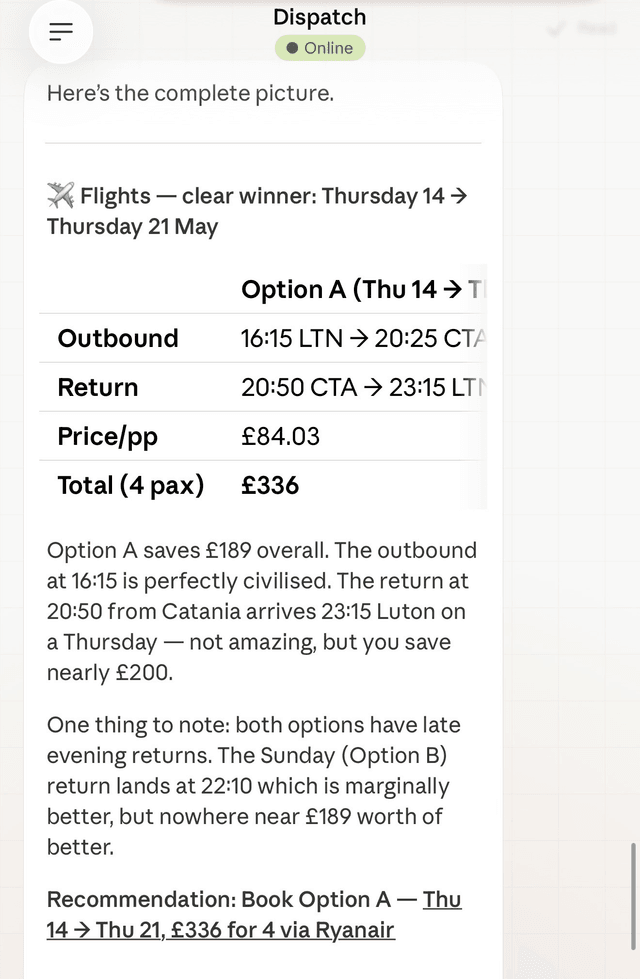
Flight options with per-person and total pricing, departure times, and a clear recommendation with reasoning.
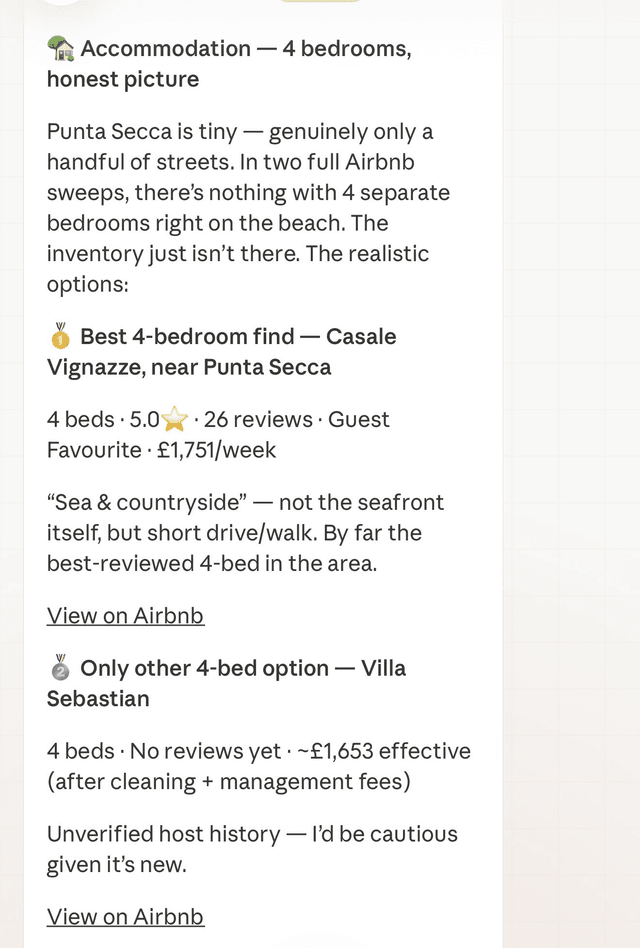
Accommodation search with honest reviews. 'Not the seafront itself, but short drive. Best-reviewed 4-bed in the area.'
Trip Cost Summaries
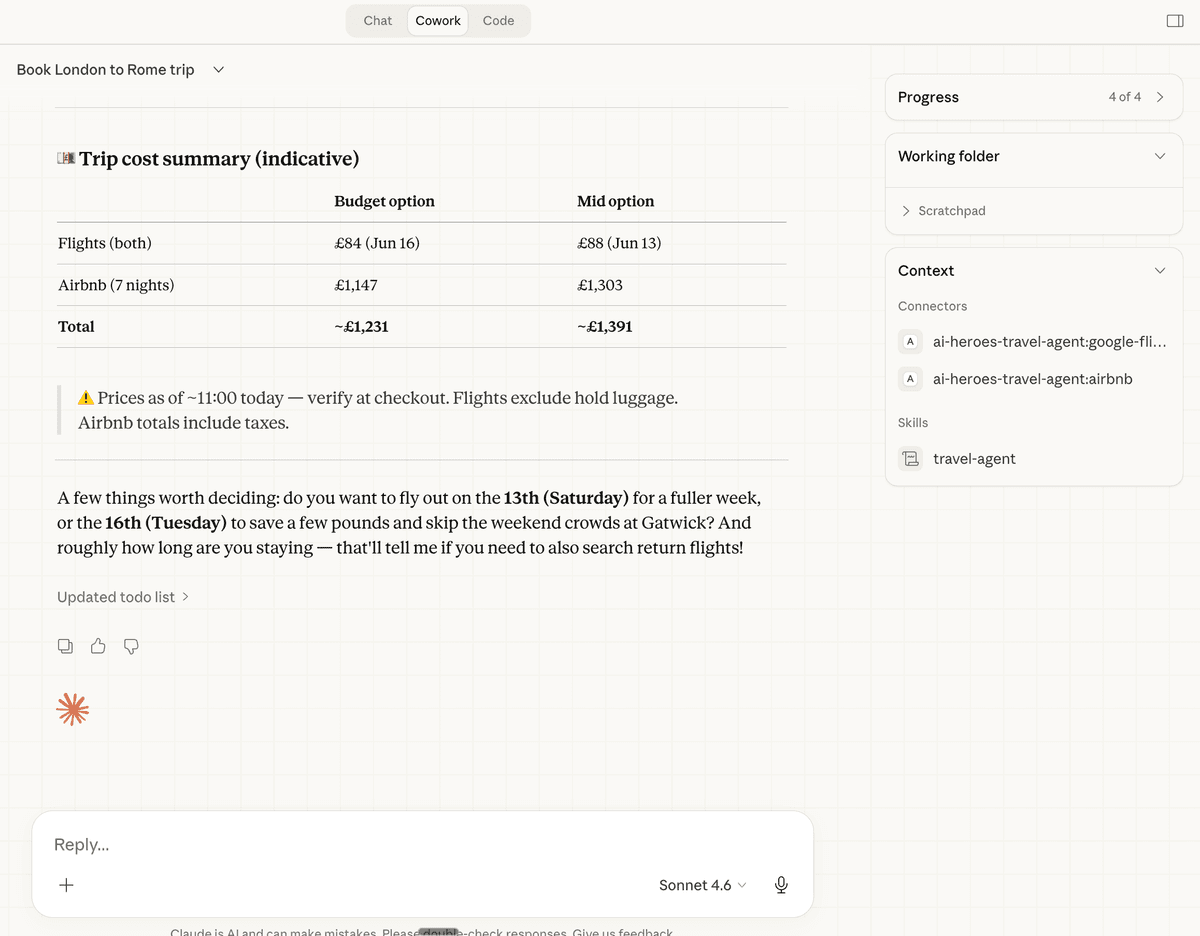
Every search ends with a trip cost summary. Flights and accommodation side by side, with budget and mid-range options so you can make an informed decision.
Prices are timestamped and flagged as indicative. The plugin tells you to verify at checkout because prices move. It also suggests which departure day saves money and asks if you want return flights searched.
After You Book: Monitoring & Scheduled Tasks
The plugin does not disappear after you book. It sets up scheduled price watches, monitors for drops, and sends you alerts when rebooking would save money. This is fully functional — not a roadmap item.
Price Alerts with Reasoning
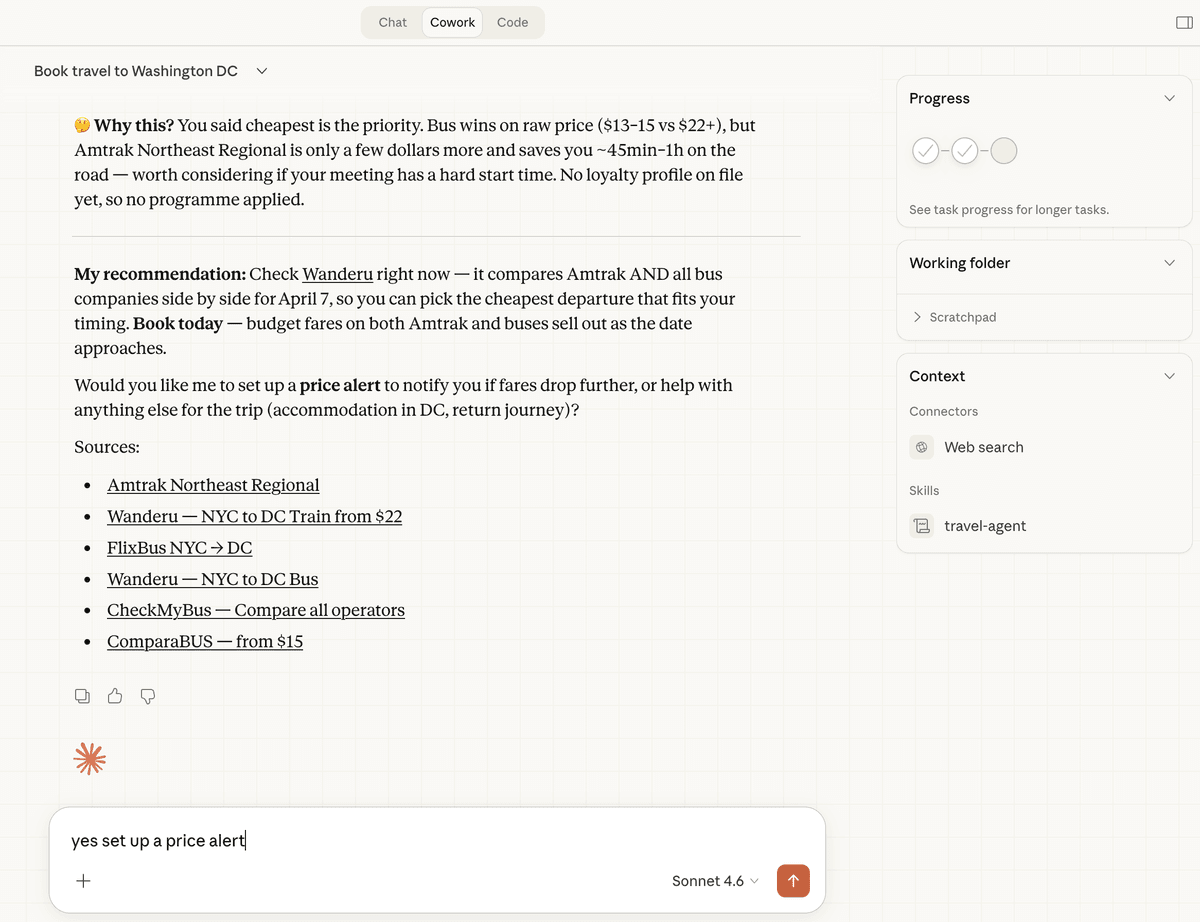
When you book, tell the plugin what you paid. It compares options, explains why one is cheaper (bus vs train, for example), and offers to set up monitoring. Every recommendation comes with the reasoning: 'Bus wins on raw price ($13-15 vs $22+), but Amtrak is only a few dollars more and saves you 45 minutes.'
Scheduled Price Monitoring
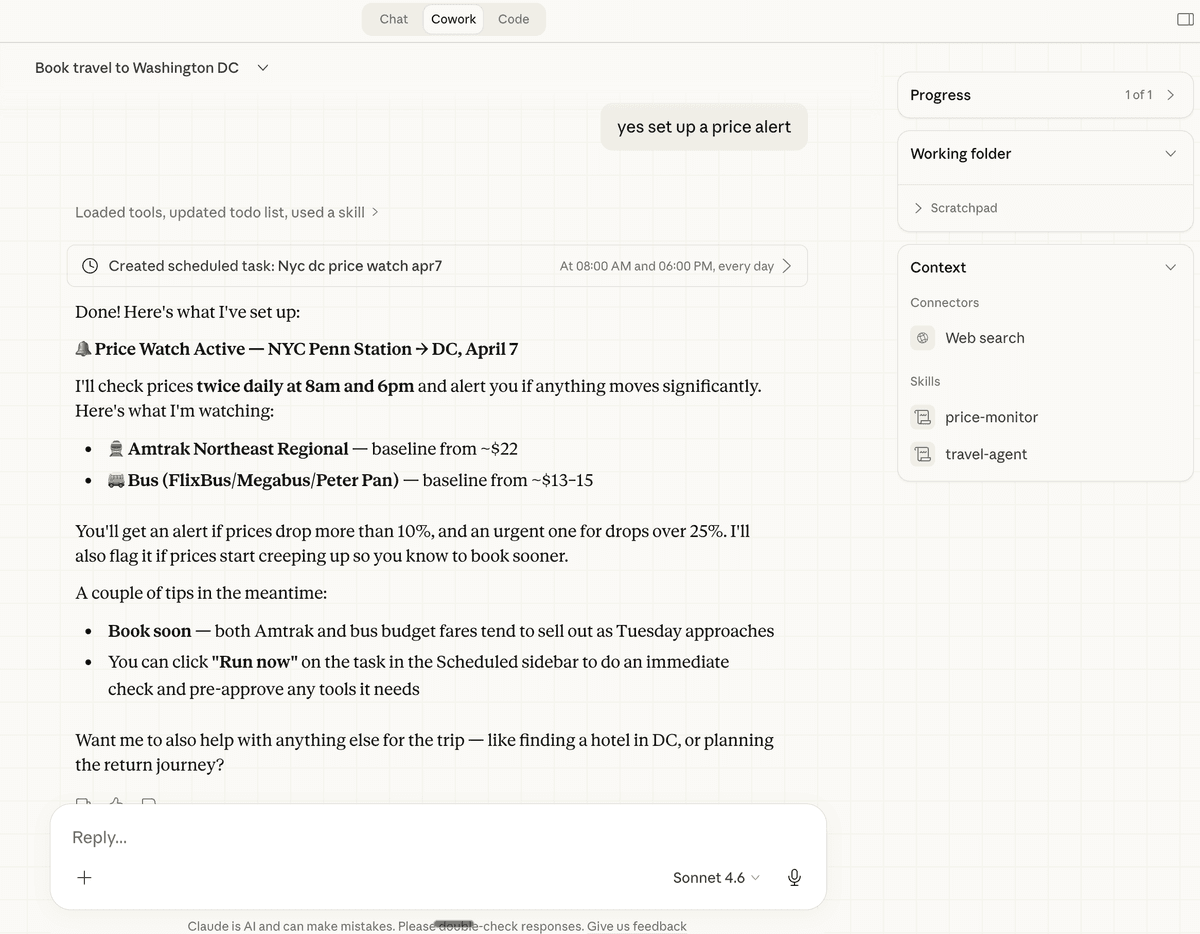
The plugin creates scheduled tasks that check prices at regular intervals — typically twice daily. It monitors both your booked option and alternatives. If prices drop more than 10%, you get an alert. If they drop more than 25%, you get an urgent alert.
What you need for monitoring
- Your computer needs to be running for local scheduled tasks to execute. The plugin checks at the intervals you set.
- For mobile monitoring, set up Dispatch (see below). Scheduled tasks still run on your desktop computer, so keep your desktop session open and your machine awake.
- You can click 'Run now' on any scheduled task in the sidebar to trigger an immediate price check.
Running on Mobile: Dispatch
Dispatch is a feature built into the Claude mobile app that connects to your Cowork desktop session. Assign travel tasks on the go, check prices, and get monitoring alerts wherever you are — as long as your desktop is running.
Getting set up with Dispatch
- 1Update the Claude app to the latest version on iOS or Android — Dispatch is built in, no separate app needed
- 2Sign in with the same Anthropic account you use for Claude Cowork (Pro or Max plan required)
- 3Open Cowork on desktop or mobile, click "Dispatch" in the left side panel, then click "Get started" and toggle on file access
- 4Ask travel questions the same way you would on desktop. The plugin has full access to flight and accommodation search within your existing Cowork context
Important: Scheduled tasks set up via Dispatch run on your desktop computer, not on any Anthropic server. Claude Desktop must be open and your computer must be awake for tasks to execute — including price monitoring alerts. This means you'll need to keep your computer on for background monitoring to work. It also means they run when your phone is locked or off.
Use Cases
Real scenarios the plugin handles every week. Each one links to a detailed walkthrough with screenshots and example prompts you can use.
Flexible Date & Price Search
Scan a full month for the cheapest travel window. The plugin weighs flight times against your constraints and finds combinations you would miss manually.
See examples →Family & Constraint-Aware Planning
Travel with toddlers, elderly parents, or mixed groups. The plugin factors in nap schedules, accessibility, free child fares, and transfer complexity.
See examples →Train vs. Flight Comparison
Side-by-side transport mode comparison with real costs for your full party. Door-to-door time, luggage, child fares, and city-centre arrivals.
See examples →Accommodation Selection
Honest Airbnb and hotel reviews with layout checks, neighbourhood assessments, and direct booking links. No sponsored results.
See examples →Post-Booking Price Monitoring
Scheduled price watches that run twice daily. Alerts when rebooking saves money after fees. Tracks alternatives you did not book.
See examples →Loyalty Programme Planning
Routes through preferred hubs, tracks tier progress, flags when a cheaper option costs you status. Applies membership numbers automatically.
See examples →Is This Right for You?
Best for
- Families who find travel planning overwhelming and want the thinking done for them
- Frequent travellers who want their preferences remembered across every trip
- Anyone who has ever had 14 tabs open comparing flights, hotels, and train times
- People who care about loyalty programmes and want every trip to count towards status
Not designed for
- —Corporate travel managers with enterprise booking systems already in place
- —People who enjoy the process of manually researching every option
- —One-off simple flights where a basic search engine is sufficient
- —Travel agents looking for a white-label product (this is a personal assistant)
Frequently Asked Questions
Yes. The plugin itself is completely free and open source. You need a Claude Pro or Team subscription to use Claude Code, which is where the plugin runs.
It works best with Claude Sonnet or Opus. The plugin uses multiple skills and MCP tool connections that benefit from the reasoning capability of larger models.
Not directly. It researches, compares, and recommends with direct booking links. You make the final click. This is deliberate: you stay in control of every purchase.
It connects to Google Flights and Airbnb through MCP (Model Context Protocol) servers. Prices are live-verified, not cached or estimated. It also searches the web for train routes, ferry schedules, and local transport options.
Your preferences are stored locally in Claude's memory system. Nothing is sent to external servers beyond the search queries needed to find flights and accommodation.
Same plugin, different install method. Claude Code uses a command-line install or desktop app upload. Cowork uses a zip upload through the browser. The features, MCP connectors, and skills are identical.
Yes. Multi-leg routing with different transport modes is one of its strongest capabilities. It handles inter-city trains, island ferries, and connecting flights as part of a single itinerary.
It works well for individual business travellers who manage their own bookings. It is not designed to replace corporate travel management systems with approval workflows.
After you book, the plugin creates a scheduled task that checks prices at regular intervals — typically twice daily at 8am and 6pm. If prices drop more than 10%, you get an alert with the calculation of whether rebooking saves money after fees. On desktop and Dispatch, tasks run on your desktop computer, so it needs to stay on.
Yes. Flight and accommodation search works globally. Train search is strongest for European rail networks, but the plugin handles worldwide destinations.
It runs the interactive onboarding questionnaire. Three quick questions about your travel dates, party composition, and priorities, followed by a profile setup where you provide your home airport, budget range, loyalty programmes, and transport preferences. Takes about two minutes.
No. The MCP connections to Google Flights, Airbnb, TfL, and web search are bundled with the plugin. They activate automatically when you install. No API keys, no configuration, no additional accounts.
One conversation. No more tabs.
Install the plugin, run /travel-setup, and let it handle the research. Free, open source, no catch.
Need help getting started?
Book a quick call and we will walk you through the setup, show you how to get the most out of it, and answer any questions about what it can do for your travel.